
GIS / BIM 切换组件
功能介绍
通过 GIS / BIM 切换组件,能够在 GIS 功能与 BIM 功能之间自由切换。
本文推荐使用右键菜单 开启 3DTiles 模型交互事件 进行 GIS / BIM 切换。
你可以使用组件 BIM 场景视图盒子组件 以更好地控制视角与摄像机。
注:该功能使用了 elementUI 库,使用前需安装该库,具体方法见 elementUI 安装 。
不妨通过代码示例在 Vue 中尝试一下:
在线演示
点击 在线链接 以查看在线演示。
组件代码示例
默认路径为 components/GisBimSwitch/index.vue
vue
<template>
  <div>
    <!-- GIS / BIM 切换组件 -->
    <el-card class="box-card">
      <div
        id="move-layer"
        class="title"
        @mousedown="mousedown"
        @mouseup="mouseup"
      >
        GIS / BIM 切换组件
      </div>
      <hr />
      <div class="button" @click="gbSwitch(false)">切换 GIS</div>
      <div class="button" @click="gbSwitch(true)">切换 BIM</div>
    </el-card>
  </div>
</template>

<script type="text/javascript">
import * as Cesium from 'cesium'

export default {

  methods: {
    init (bimRecallFunc = null, gisRecallFunc = null) {
      this.bimRecallFunc = bimRecallFunc;
      this.gisRecallFunc = gisRecallFunc;
    },

    gbSwitch (bool = true) {

      let that = this;

      const handler = new Cesium.ScreenSpaceEventHandler(window.viewer.scene.canvas);

      // 开启地下模式
      uniCore.model.undergroundMode(bool);

      if (bool) {
        this.$message(
          { message: "请点击所需切换到BIM场景的模型。" }
        )
        handler.setInputAction(function (e) {
          const pickObj = viewer.scene.pick(e.position);
          if (!!pickObj) {
            const modelId = pickObj.id?.id === undefined ? pickObj.tileset.debugPickedTile.id : pickObj.id?.id;
            const lockBoundingSphere = pickObj?.primitive.boundingSphere === undefined ? pickObj.tileset.boundingSphere : pickObj.primitive.boundingSphere;
            const lockAxiz = uniCore.position.cartesian3_2axis(lockBoundingSphere.center);

            that.$message(
              { message: `已点击到模型:${modelId}` }
            )

            // 触发回调函数
            if (!!that.bimRecallFunc) {
              that.bimRecallFunc(pickObj, lockBoundingSphere);
            }

            window.viewer.scene.backgroundColor = Cesium.Color.fromCssColorString("#b9d3ee");
            window.viewer.terrainProvider = null;

            // 只留该模型显示,其他全部隐藏
            uniCore.model.setPrimitivesShow(modelId, false, false)

            // 隐藏所有HTML标签
            try {
              window.htmlTipList && window.htmlTipList.forEach(e => {
                document.getElementById(e).style.display = "none";
              })
            } catch (error) {

            }

            // 隐藏所有标签
            // 记住先前的状态
            window.tipBeforeSet = []
            window.viewer.scene.primitives._primitives.forEach((e) => {
              try {
                for (let i of e._labels) {
                  window.tipBeforeSet.push(i.show)
                  i.show = false;
                }
              } catch (error) { }
            })

            // 打开视角锁定
            uniCore.position.lockTo(window.viewer, bool, lockAxiz, -45, -30, pickObj.primitive.boundingSphere.radius * 3);

            handler.removeInputAction(Cesium.ScreenSpaceEventType.LEFT_CLICK)//移除事件

          }

        }, Cesium.ScreenSpaceEventType.LEFT_CLICK);
      } else {
        window.viewer.scene.backgroundColor = null;
        window.viewer.terrainProvider = window.terrainProvider;

        // 触发回调函数
        if (!!that.gisRecallFunc) {
          that.gisRecallFunc();
        }

        // 还原所有模型显示
        uniCore.model.setPrimitivesShow('', true)

        // 还原所有HTML标签
        try {
          window.htmlTipList && window.htmlTipList.forEach(e => {
            document.getElementById(e).style.display = "block";
          })
        } catch (error) {

        }

        // 还原所有标签
        window.viewer.scene.primitives._primitives.forEach((e) => {
          try {
            e._labels.forEach((ele, index) => {
              ele.show = window.tipBeforeSet[index]
            })
          } catch (error) { }
        })

        // 关闭视角锁定
        uniCore.position.lockTo(uniCore.viewer, bool, [0, 0]);

      }

    },

    /**
 * 鼠标与窗口拖动相关
 */
    mousedown (event, id) {
      if (document.elementFromPoint(event.clientX, event.clientY).id === 'move-layer') {
        this.selectElement = document.elementFromPoint(event.clientX, event.clientY).parentNode.parentNode;
        document.querySelectorAll('.box-card').forEach((e) => {
          e.style.zIndex = 1000;
        })
        this.selectElement.style.zIndex = 1001;
        var div1 = this.selectElement
        this.selectElement.style.cursor = 'move'
        this.isDowm = true
        var distanceX = event.clientX - this.selectElement.offsetLeft
        var distanceY = event.clientY - this.selectElement.offsetTop
        document.onmousemove = function (ev) {
          var oevent = ev || event
          div1.style.left = oevent.clientX - distanceX + 'px'
          div1.style.top = oevent.clientY - distanceY + 'px'
        }
        document.onmouseup = function () {
          document.onmousemove = null
          document.onmouseup = null
          div1.style.cursor = 'default'
        }
      }

    },
    //鼠标抬起
    mouseup () {
      this.isMove = false;
      this.selectElement = "null"
    }


  }
}
</script>

<style rel="stylesheet/scss" lang="scss" scoped>
::v-deep .el-card__body {
  padding: 20px 0px 0 0px;
}
::v-deep .box-card {
  position: absolute;
  top: 3%;
  left: 3%;
  width: 300px;
  z-index: 1;
  background: rgb(26 26 26 / 83%);
  border: 1px solid rgba(255, 255, 255, 0.3);
  box-shadow: 0px 24px 54px 0px rgba(35, 41, 50, 0.5);
  border-radius: 15px;
  padding: 0 24px 12px 24px;
  margin-bottom: 12px;
  -webkit-backdrop-filter: blur(10px);
  backdrop-filter: blur(10px);
  transition: none;
  user-select: none;

  .title {
    font-size: 18px;
    font-weight: bold;
    color: #fefeff;
    display: block;
    margin-left: 24px;
    margin-bottom: 10px;
    user-select: none;
    overflow: hidden;
    cursor: move;
  }

  hr {
    margin-left: 24px;
    margin-bottom: 10px;
    border: none;
    border-bottom: 1px solid #ffffff1a;
  }

  .button {
    display: inline-flex;
    margin: 5px 10px;
    color: white;
    background: #4d4d4dd1;
    border-radius: 10px;
    padding: 7px 20px;
    cursor: pointer;
    transition: 0.3s;
  }
}
</style>
调用代码示例
vue
<template>
  <div id="unicoreContainer">
    <!-- GIS / BIM 切换组件窗口卡片开始 -->
    <gbSet ref="gbSetId"></gbSet>
    <!-- GIS / BIM 切换组件窗口卡片结束 -->
    <!-- BIM视图盒子组件开始 -->
    <bcSet ref="bcSetId"></bcSet>
    <!-- BIM视图盒子组件结束 -->
  </div>
</template>

<script>
import { UniCore } from 'unicore-sdk'
import { config } from 'unicore-sdk/unicore.config'
import 'unicore-sdk/Widgets/widgets.css'
import gbSet from '@/components/GisBimSwitch/index'; //GIS/BIM切换组件
import bcSet from '@/components/BimCubeSet/index.vue'; //BIM视图盒子组件

export default {

  components: {
    gbSet, bcSet
  },
  // 生命周期 - 挂载完成(可以访问DOM元素)
  mounted () {
    this.init();
  },

  // 方法集合
  methods: {

    /**
    * 通用图形引擎初始化
    */
    init () {

      // 初始化UniCore

      // 目前采用Cesium的地形&底图数据,这里配置Cesium的token
      let accessToken = "eyJhbGciOiJIUzI1NiIsInR5cCI6IkpXVCJ9.eyJqdGkiOiIxNjEwMzI4My01MjBmLTQzYzktOGZiMS0wMDRhZjE0N2IyMGIiLCJpZCI6MTc1NzkyLCJpYXQiOjE3MTM3NzQ3OTh9.zU-R4MNvHr8rvn1v28PQfDImyutnpPF2lmEgGeSPckQ";
      // 初始化unicore
      let uniCore = new UniCore(config, accessToken);
      uniCore.init("unicoreContainer");
      window.uniCore = uniCore;
      let viewer = uniCore.viewer;

      // 视角初始化
      uniCore.position.buildingPosition(viewer, [113.12380548015745, 28.250758831850005, 700], -20, -45, 1);

      // 初始化视图盒子方法
      this.$refs.gbSetId.init(
        (pickObj, boundingSphere) => this.$refs.bcSetId.show(uniCore, uniCore.position.cartesian3_2axis(boundingSphere.center), boundingSphere.radius * 3),
        () => this.$refs.bcSetId.hide()
      );

      /**
       * 小别墅1号示例
       */
      let options = {
        id: '小别墅1号示例',
        url: '../../assets/3Dtiles/sample3_方法2_小别墅属性(1)/tileset.json',
        propertysURL: '../../assets/3Dtiles/sample3_方法2_小别墅属性(1)/01 小别墅.json'
      }
      //加载3dtiles
      uniCore.model.createTileset(options.url, options).then(cityLeft => {
        uniCore.model.changeModelPos(cityLeft, [113.12098820449636, 28.256150218457687, 130], [0, 0, 0])

        // 开启右键菜单、点击高亮、属性property
        uniCore.interact.setTilesRightClickMenu([{
          id: '小别墅1号示例',
          url: '../../assets/3Dtiles/sample3_方法2_小别墅属性(1)/tileset.json',
          propertysURL: '../../assets/3Dtiles/sample3_方法2_小别墅属性(1)/01 小别墅.json'
        }], (property) => console.log(property));
      })


      /**
         * 小别墅2号示例
         */
      uniCore.model.addGltf({
        lon: 0,
        lat: 0,
        height: 0
      }, {
        id: "小别墅2号示例",
        name: null,
        url: '../../../assets/gltf/小别墅.glb',
        scale: 1.0,
        property: null
      }).then(cityModel => {
        uniCore.model.changeModelPos(cityModel, [113.12098820449636, 28.257150218457687, 130], [90, 0, 0])
      })

      // 开启glTF模型右键交互
      uniCore.interact.setGltfRightClickMenu((property) => console.log(property));
    }
  }

}
</script>
<style scoped>
#unicoreContainer {
  position: absolute;
  top: 0;
  left: 0;
  width: 100%;
  height: 100%;
  overflow: hidden;
  background: black;
}
</style>
示例运行结果
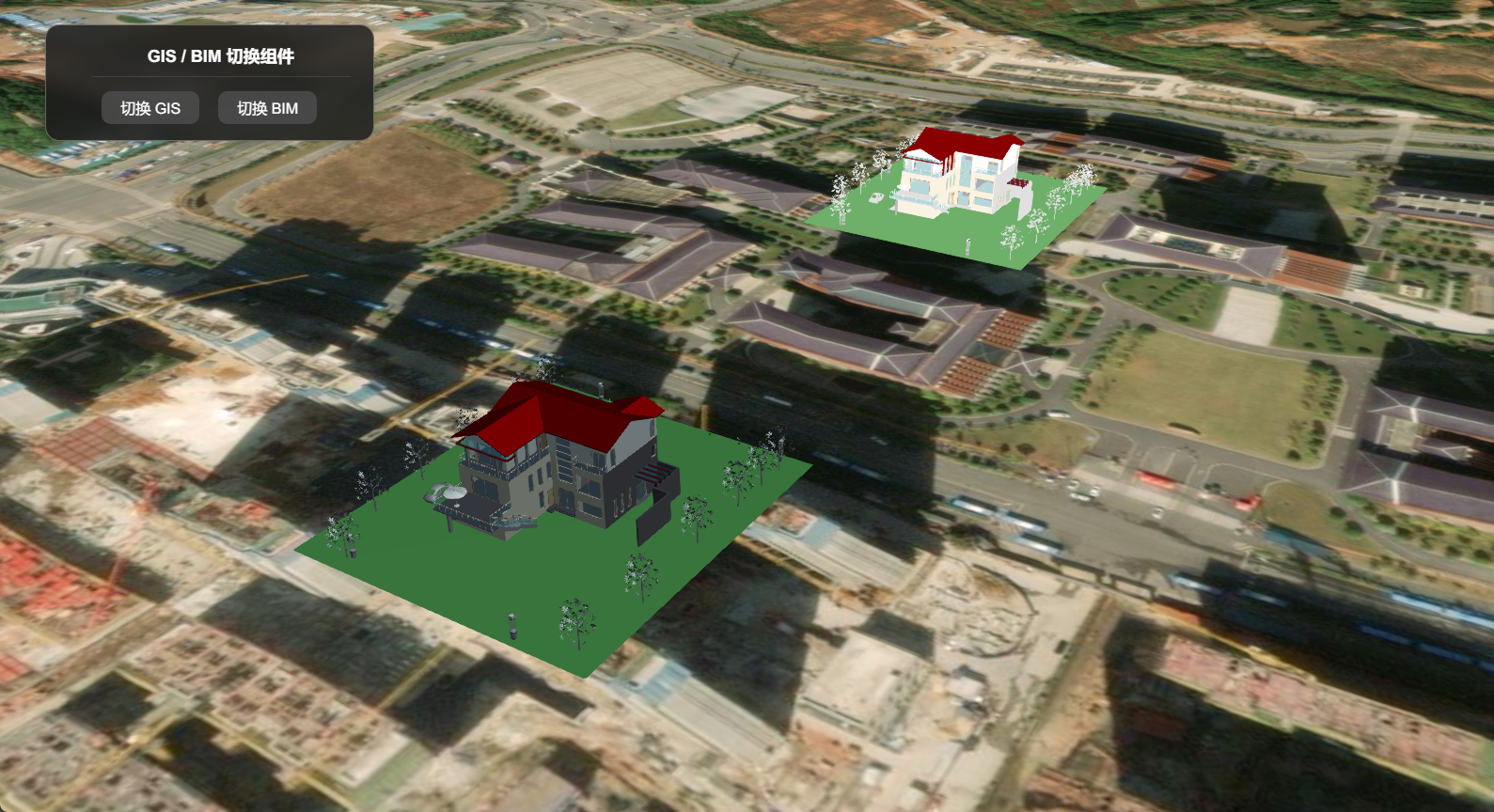
切换 GIS 模式效果(加载多源异构数据及GIS系统):
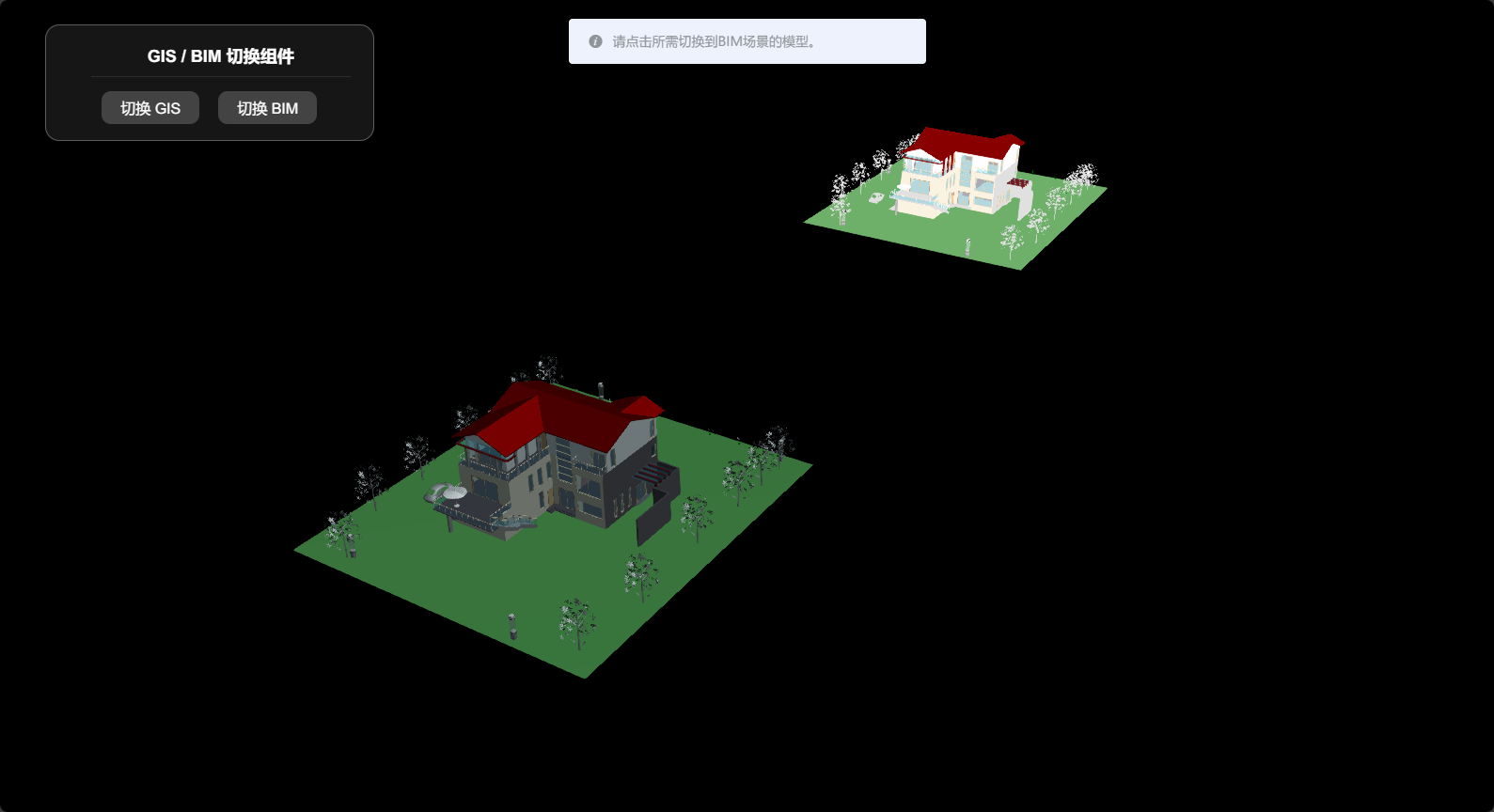
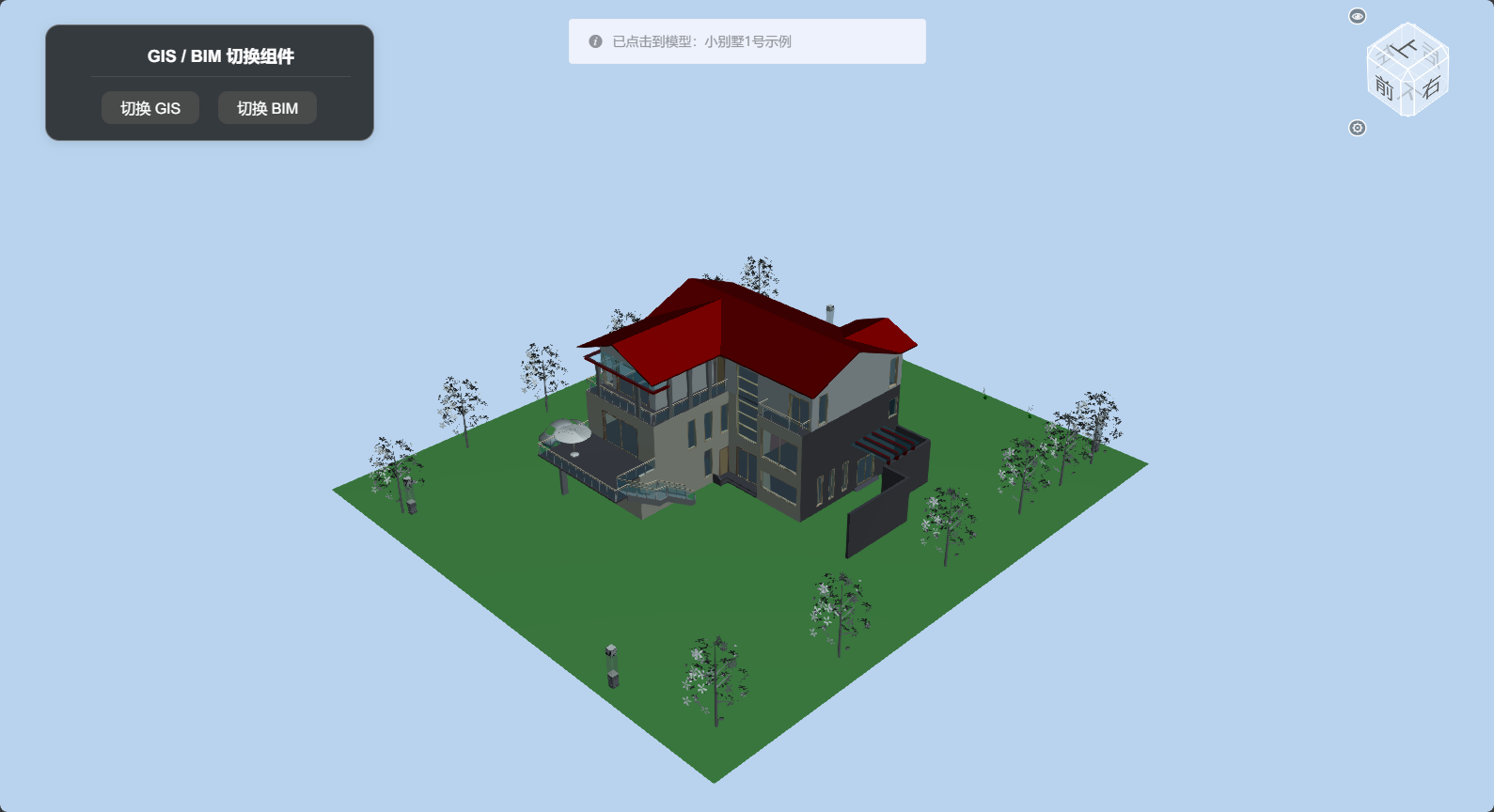
切换 BIM 模式效果(切换到单个模型的BIM系统):
等待点击所需切换到 BIM 模式的模型(示例中分别为小别墅的 3DTiles 模型及 glTF模型)
切换至对应 BIM 模式模型
调用代码示例中的关键代码
组件提供 init 方法,参数分别为切换 BIM 场景触发的回调函数及切换至 GIS 场景触发的回调函数。其中切换 BIM 场景触发的回调函数提供两个参数,分别是点击模型返回的tileset,及模型的包围盒数据。
js
this.$refs.gbSetId.init(
  bimRecallFunc,
  gisRecallFunc
);
示例中使用了 BIM 场景视图盒子组件 :
js
// 初始化视图盒子方法
this.$refs.gbSetId.init(
  (pickObj, boundingSphere) => this.$refs.bcSetId.show(uniCore, uniCore.position.cartesian3_2axis(boundingSphere.center), boundingSphere.radius * 3),
  () => this.$refs.bcSetId.hide()
);