
根据 URL 加载 3DTiles 模型
Model 类的方法 - createTileset
方法介绍
UniCore 内置 Model 类,提供 createTileset 方法用于加载 3DTiles 模型文件。该方法必须传入 url 变量及 options 配置变量。
url变量即传入模型文件tileset.json的url位置,options 配置变量可配置的参数较多,本节将options详细参数放置在本节中的拓展小节中,最基本的配置参数如:
let options = {
  id: '城市白膜'
}
变量的JSDoc形式如下:
/**
 * 异步添加3dTiles模型(新
 * @param {*} url
 * @param {*} options
 * @param {*} callback(可选)
 * @returns
 */
你可以通过加入 模型加载进度条组件 提升用户体验。
不妨通过代码示例在 Vue 中尝试一下(相关模型文件在本章 阅前提醒 中的内网Git链接中可获取):
在线演示
点击 在线链接 以查看在线演示。
代码示例
<template>
  <div id="unicoreContainer"></div>
</template>

<script>
import { UniCore } from 'unicore-sdk'
import { config } from 'unicore-sdk/unicore.config'
import 'unicore-sdk/Widgets/widgets.css'

export default {
  // 生命周期 - 挂载完成(可以访问DOM元素)
  mounted () {
    this.init();
  },

  // 方法集合
  methods: {

    /**
    * 通用图形引擎初始化
    */
    init () {

      // 初始化UniCore

      // 目前采用Cesium的地形&底图数据,这里配置Cesium的token
      let accessToken = "eyJhbGciOiJIUzI1NiIsInR5cCI6IkpXVCJ9.eyJqdGkiOiIxNjEwMzI4My01MjBmLTQzYzktOGZiMS0wMDRhZjE0N2IyMGIiLCJpZCI6MTc1NzkyLCJpYXQiOjE3MTM3NzQ3OTh9.zU-R4MNvHr8rvn1v28PQfDImyutnpPF2lmEgGeSPckQ";
      // 初始化unicore
      let uniCore = new UniCore(config, accessToken);
      uniCore.init("unicoreContainer");

      // 视角初始化
      uniCore.position.buildingPosition(uniCore.viewer, [113.12380548015745, 28.250758831850005, 700], -20, -45, 1);

      let options = {
        id: '城市白膜',
        url: '../../../assets/3Dtiles/changshaCityModel/tileset.json'
      }
      //加载3dtiles
      uniCore.model.createTileset(options.url, options).then(cityLeft => {
        uniCore.model.changeModelPos(cityLeft, [113.12098820449636, 28.256150218457687, 50], [0, 0, -90], [23.8, 23.8, 23.8])
      })
    }

  }

}
</script>
<style scoped>
#unicoreContainer {
  position: absolute;
  top: 0;
  left: 0;
  width: 100%;
  height: 100%;
  overflow: hidden;
  background: black;
}
</style>
示例运行结果
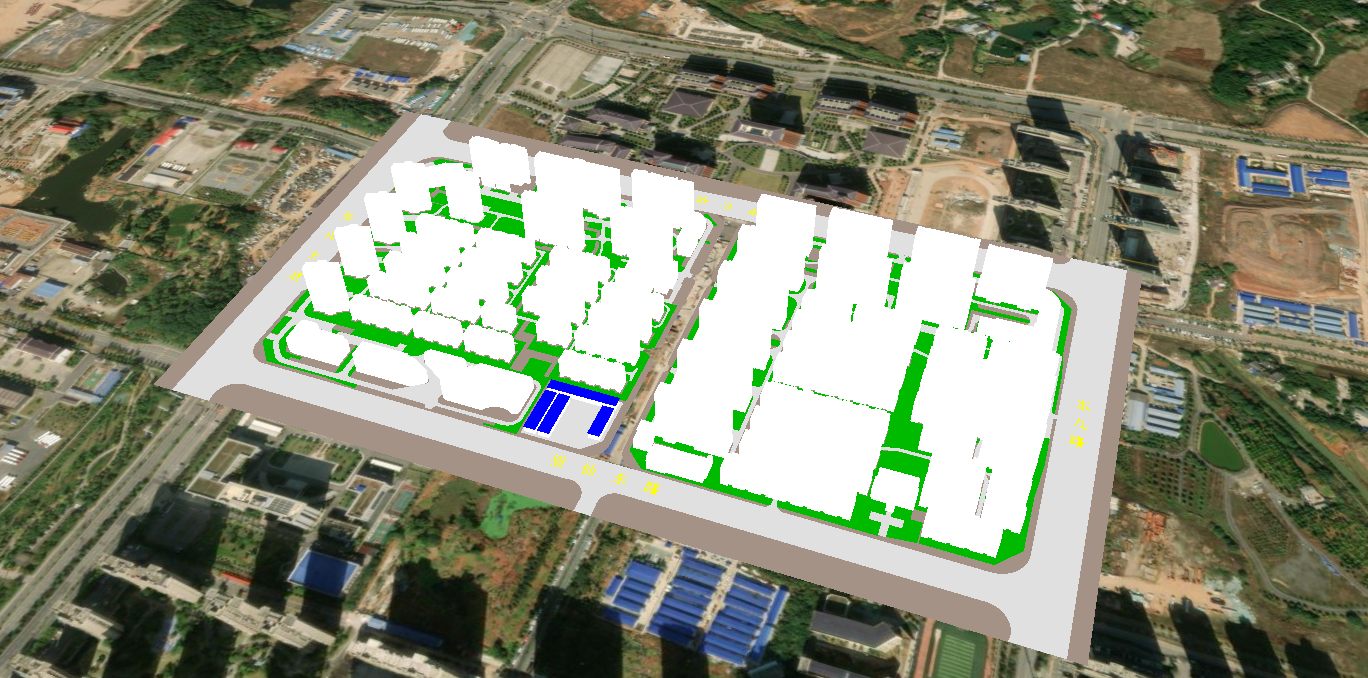
关键代码
//加载3dtiles
uniCore.model.createTileset(options.url, options).then(cityLeft => {
  uniCore.model.changeModelPos(cityLeft, [113.12098820449636, 28.256150218457687, 50], [0, 0, -90], [23.8, 23.8, 23.8])
})
通过阴影增强模型质感
推荐你使用阴影增强模型质感,你可以将以下代码拷贝运行,根据情况调整参数:
let viewer = window.viewer;
viewer.shadows = true;
viewer.scene.shadowMap.maximumDistance = 5000; // 扩大阴影投射范围
viewer.scene.shadowMap.softShadows = true;     // 启用柔和阴影
viewer.shadowMap.darkness = 0.8;  // 0.0纯黑 → 1.0无阴影
viewer.shadowMap.color = new Cesium.Color(0.1, 0.1, 0.1, 0.8); // RGB+透明度
viewer.shadowMap.softShadows = true;
viewer.shadowMap.size = 4096;     // 阴影贴图分辨率提升
viewer.shadowMap.numShadowCascades = 4; // 级联阴影层级
viewer.shadowMap.cascadeSplitDistance = [0.1, 0.2, 0.5, 1.0];
viewer.shadowMap.fadeOverlap = 0.3; // 级间过渡平滑度
viewer.scene.skyAtmosphere.luminanceAtZenith = 2.0; // 天顶亮度增强
利用回调函数改变模型材质颜色
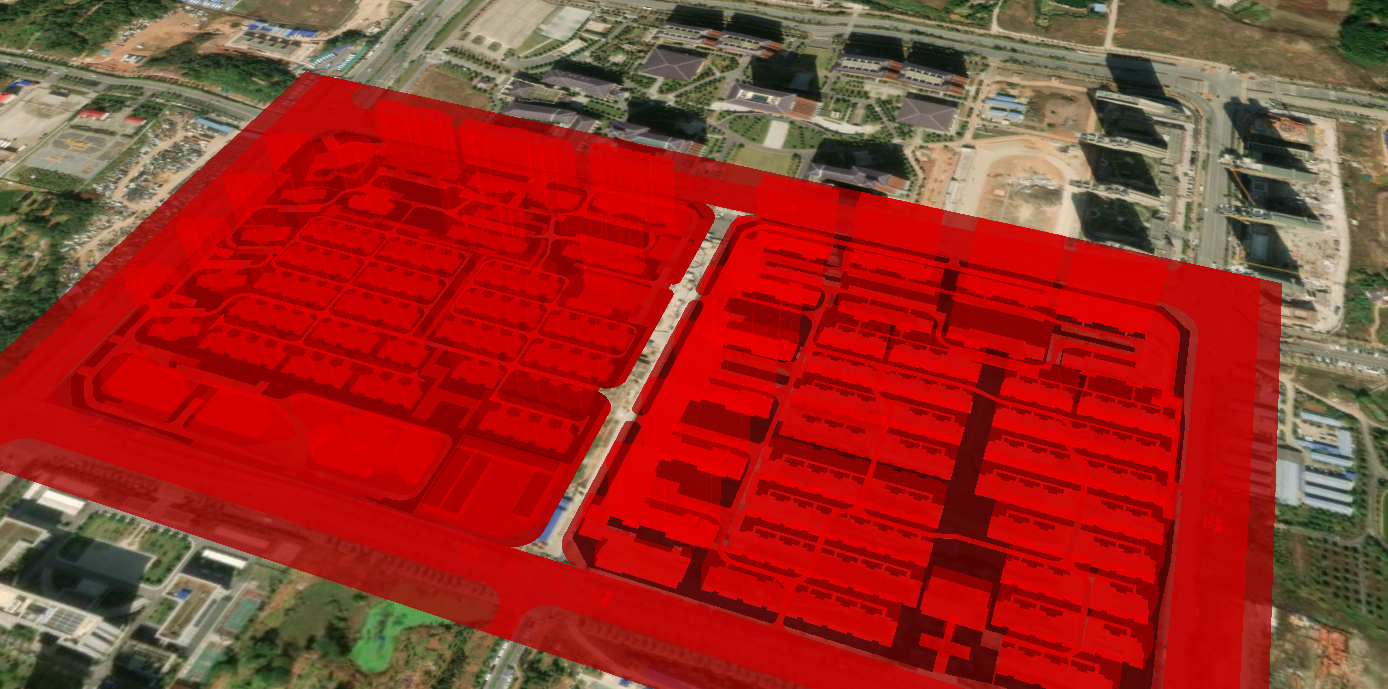
通过将关键代码中的加载 3dtiles 部分修改为以下代码,即可利用回调函数改变模型材质颜色。
//加载3dtiles
uniCore.model.createTileset(options.url, options, (tileset) => { tileset.style = new Cesium.Cesium3DTileStyle({ color: "rgba(255,0, 0, 0.5)" }) }).then(cityLeft => {
  uniCore.model.changeModelPos(cityLeft, [113.12098820449636, 28.256150218457687, 50], [0, 0, -90], [23.8, 23.8, 23.8])
})
利用回调函数改变模型着色器(如亮度)
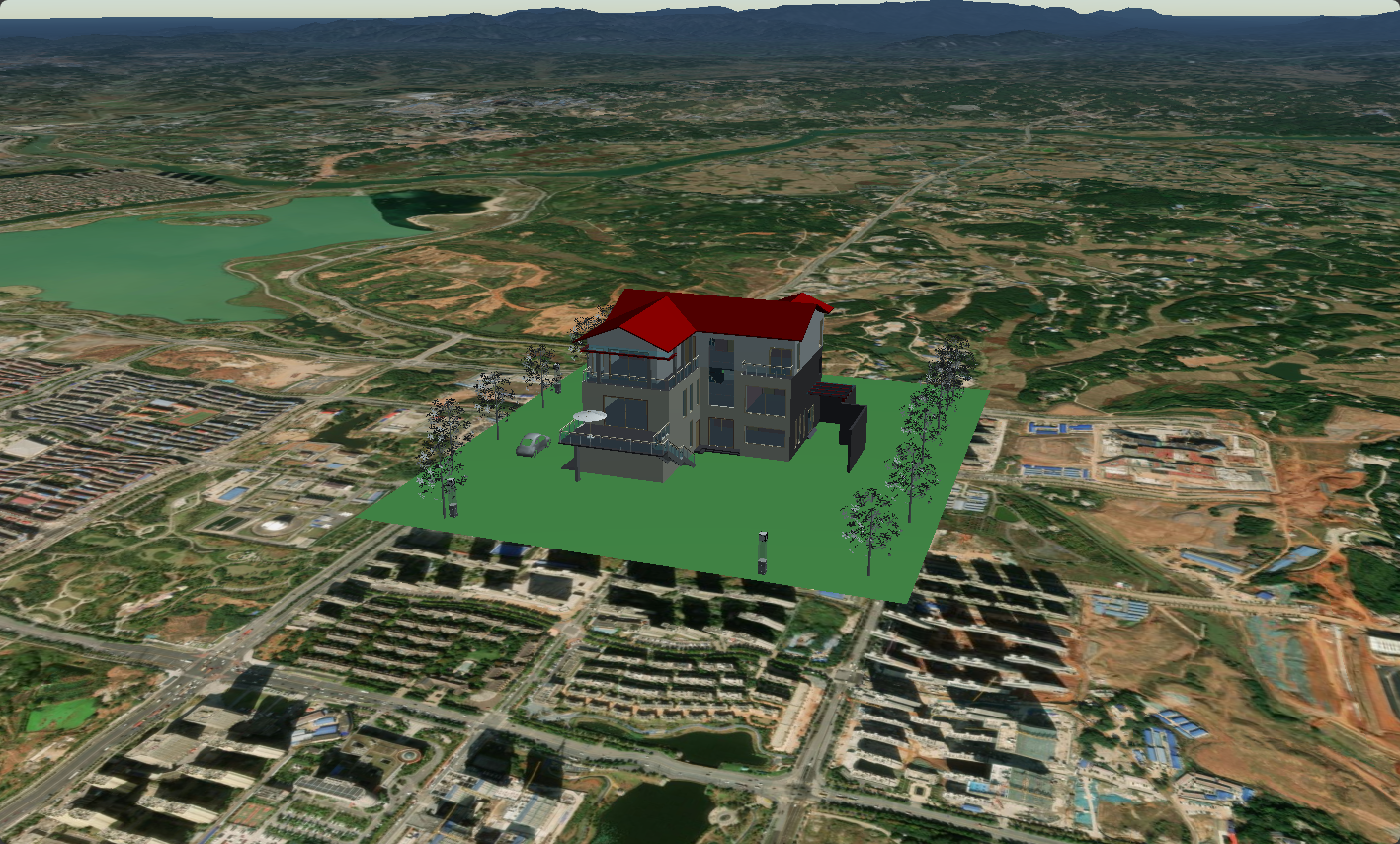
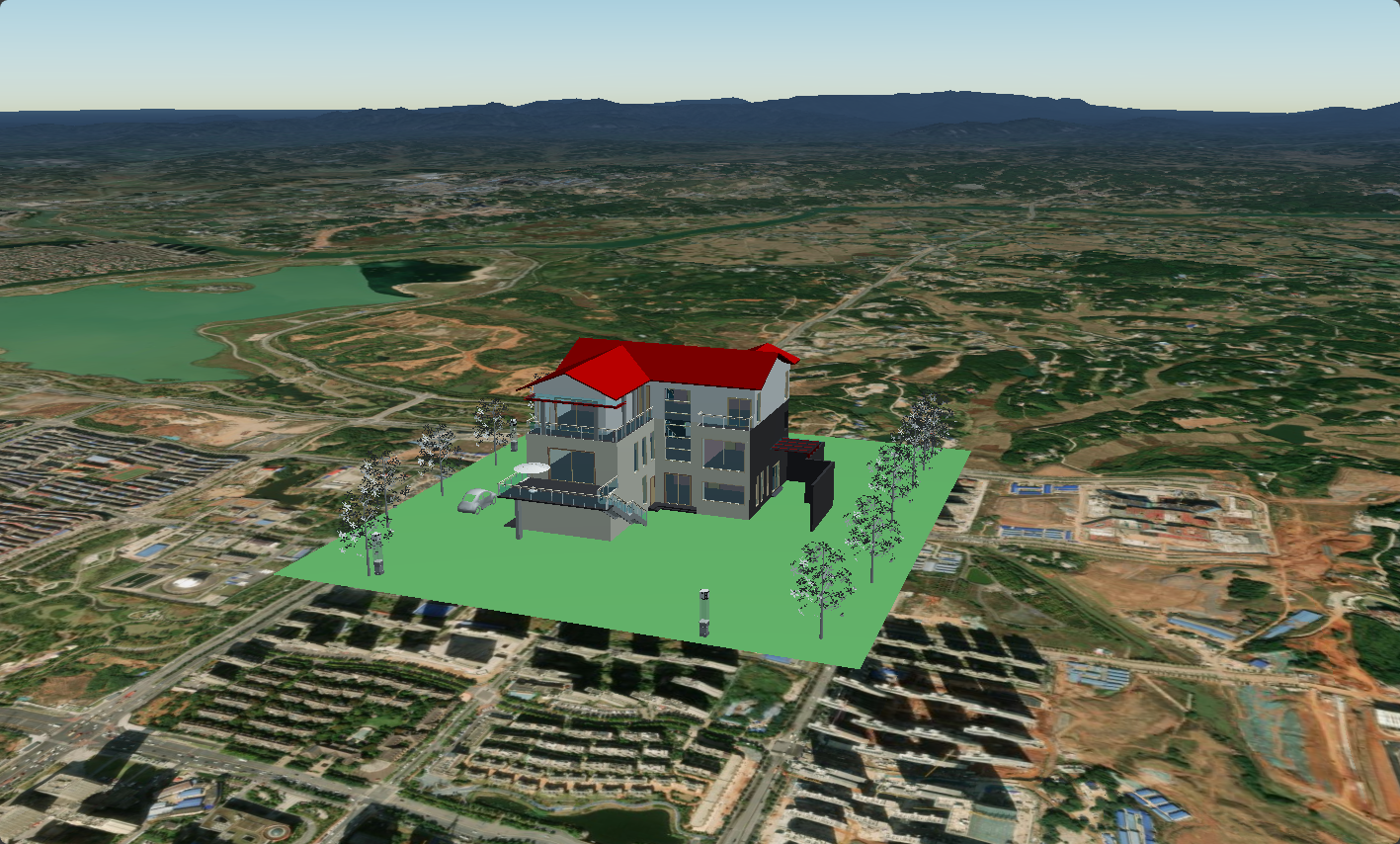
通过将关键代码中的加载 3dtiles 部分修改为以下代码,即可利用回调函数改变模型着色器(如亮度)。调整代码中的 material.diffuse * (1.0) 的 1.0 数值可调整模型亮度。你也可以尝试使用更多不同的着色器代码修改模型显示效果。
//加载3dtiles
uniCore.model.createTileset('../../assets/3Dtiles/sample3_方法2_小别墅属性(1)/tileset.json', options, (tileset) => {
  let customShader = new Cesium.CustomShader({
    // lightingModel: Cesium.LightingModel.UNLIT,
    lightingModel: Cesium.LightingModel.PBR,

    //片元着色器
    fragmentShaderText: `
  void fragmentMain(FragmentInput fsInput, inout czm_modelMaterial material) {
    vec3 positionMC = fsInput.attributes.positionMC;
    //此处以下为光线效果
    material.diffuse += material.diffuse * (1.0);
  }`
  })

  tileset.customShader = customShader

}).then(cityLeft => {
  uniCore.model.changeModelPos(cityLeft, [113.12098820449636, 28.256150218457687, 130], [0, 0, 0], [23.8, 23.8, 23.8])
})
修改前:
修改后:
拓展
关于options的配置,以下可列举作为参考(键名对应可选变量,值对应默认值):
id: undefined,
name: undefined,
url: url, // 默认为3dtiles模型url
lumimanceAtZenith: 0.2,
lightColor: new Cesium.Cartesian3(0.3, 0.3, 0.3),
modelMatrix: undefined,
scale: 1,
shadow: true,
skipLevelOfDetail: true, // 跳过细节级别
skipLevels: 1, // 跳过的级别数
maximumMemoryUsage: 1024 * 1024 * 1024, // 设置3D Tiles的最大内存使用量
baseScreenSpaceError: 2048, // 基础屏幕空间误差
maximumScreenSpaceError: 32, // 最大屏幕空间误差
skipScreenSpaceErrorFactor: 16, // 跳过屏幕空间误差因子
immediatelyLoadDesiredLevelOfDetail: false, // 是否立即加载所需的细节级别
loadSiblings: true, // 是否加载相邻的瓦片
cullWithChildrenBounds: true, // 是否使用子瓦片边界进行剔除
dynamicScreenSpaceError: true, // 是否启用动态屏幕空间误差
dynamicScreenSpaceErrorDensity: 0.00278, // 动态屏幕空间误差密度
dynamicScreenSpaceErrorFactor: 4.0, // 动态屏幕空间误差因子
dynamicScreenSpaceErrorHeightFalloff: 0.25, // 动态屏幕空间误差高度衰减
preloadWhenHidden: false, // 隐藏时是否预加载
cullRequestsWhileMoving: true, // 移动时是否进行剔除请求
cullRequestsWhileMovingMultiplier: 60, // 剔除请求的乘数,值越小能够更快的剔除
cacheBytes: 128, // 缓存字节数
更多 options 配置见下表,或见 ConstructorOptions:
| Name | Type | Attributes | Default | Description |
|---|---|---|---|---|
show | boolean | <optional> | true | Determines if the tileset will be shown. |
modelMatrix | Matrix4 | <optional> | Matrix4.IDENTITY | A 4x4 transformation matrix that transforms the tileset's root tile. |
modelUpAxis | Axis | <optional> | Axis.Y | Which axis is considered up when loading models for tile contents. |
modelForwardAxis | Axis | <optional> | Axis.X | Which axis is considered forward when loading models for tile contents. |
shadows | ShadowMode | <optional> | ShadowMode.ENABLED | Determines whether the tileset casts or receives shadows from light sources. |
maximumScreenSpaceError | number | <optional> | 16 | The maximum screen space error used to drive level of detail refinement. |
cacheBytes | number | <optional> | 536870912 | The size (in bytes) to which the tile cache will be trimmed, if the cache contains tiles not needed for the current view. |
maximumCacheOverflowBytes | number | <optional> | 536870912 | The maximum additional memory (in bytes) to allow for cache headroom, if more than Cesium3DTileset#cacheBytes are needed for the current view. |
cullWithChildrenBounds | boolean | <optional> | true | Optimization option. Whether to cull tiles using the union of their children bounding volumes. |
cullRequestsWhileMoving | boolean | <optional> | true | Optimization option. Don't request tiles that will likely be unused when they come back because of the camera's movement. This optimization only applies to stationary tilesets. |
cullRequestsWhileMovingMultiplier | number | <optional> | 60.0 | Optimization option. Multiplier used in culling requests while moving. Larger is more aggressive culling, smaller less aggressive culling. |
preloadWhenHidden | boolean | <optional> | false | Preload tiles when tileset.show is false. Loads tiles as if the tileset is visible but does not render them. |
preloadFlightDestinations | boolean | <optional> | true | Optimization option. Preload tiles at the camera's flight destination while the camera is in flight. |
preferLeaves | boolean | <optional> | false | Optimization option. Prefer loading of leaves first. |
dynamicScreenSpaceError | boolean | <optional> | true | Optimization option. For street-level horizon views, use lower resolution tiles far from the camera. This reduces the amount of data loaded and improves tileset loading time with a slight drop in visual quality in the distance. |
dynamicScreenSpaceErrorDensity | number | <optional> | 2.0e-4 | Similar to Fog#density, this option controls the camera distance at which the Cesium3DTileset#dynamicScreenSpaceError optimization applies. Larger values will cause tiles closer to the camera to be affected. |
dynamicScreenSpaceErrorFactor | number | <optional> | 24.0 | A parameter that controls the intensity of the Cesium3DTileset#dynamicScreenSpaceError optimization for tiles on the horizon. Larger values cause lower resolution tiles to load, improving runtime performance at a slight reduction of visual quality. |
dynamicScreenSpaceErrorHeightFalloff | number | <optional> | 0.25 | A ratio of the tileset's height that determines where "street level" camera views occur. When the camera is below this height, the Cesium3DTileset#dynamicScreenSpaceError optimization will have the maximum effect, and it will roll off above this value. |
progressiveResolutionHeightFraction | number | <optional> | 0.3 | Optimization option. If between (0.0, 0.5], tiles at or above the screen space error for the reduced screen resolution of progressiveResolutionHeightFraction*screenHeight will be prioritized first. This can help get a quick layer of tiles down while full resolution tiles continue to load. |
foveatedScreenSpaceError | boolean | <optional> | true | Optimization option. Prioritize loading tiles in the center of the screen by temporarily raising the screen space error for tiles around the edge of the screen. Screen space error returns to normal once all the tiles in the center of the screen as determined by the Cesium3DTileset#foveatedConeSize are loaded. |
foveatedConeSize | number | <optional> | 0.1 | Optimization option. Used when Cesium3DTileset#foveatedScreenSpaceError is true to control the cone size that determines which tiles are deferred. Tiles that are inside this cone are loaded immediately. Tiles outside the cone are potentially deferred based on how far outside the cone they are and their screen space error. This is controlled by Cesium3DTileset#foveatedInterpolationCallback and Cesium3DTileset#foveatedMinimumScreenSpaceErrorRelaxation. Setting this to 0.0 means the cone will be the line formed by the camera position and its view direction. Setting this to 1.0 means the cone encompasses the entire field of view of the camera, disabling the effect. |
foveatedMinimumScreenSpaceErrorRelaxation | number | <optional> | 0.0 | Optimization option. Used when Cesium3DTileset#foveatedScreenSpaceError is true to control the starting screen space error relaxation for tiles outside the foveated cone. The screen space error will be raised starting with tileset value up to Cesium3DTileset#maximumScreenSpaceError based on the provided Cesium3DTileset#foveatedInterpolationCallback. |
foveatedInterpolationCallback | Cesium3DTileset.foveatedInterpolationCallback | <optional> | Math.lerp | Optimization option. Used when Cesium3DTileset#foveatedScreenSpaceError is true to control how much to raise the screen space error for tiles outside the foveated cone, interpolating between Cesium3DTileset#foveatedMinimumScreenSpaceErrorRelaxation and Cesium3DTileset#maximumScreenSpaceError |
foveatedTimeDelay | number | <optional> | 0.2 | Optimization option. Used when Cesium3DTileset#foveatedScreenSpaceError is true to control how long in seconds to wait after the camera stops moving before deferred tiles start loading in. This time delay prevents requesting tiles around the edges of the screen when the camera is moving. Setting this to 0.0 will immediately request all tiles in any given view. |
skipLevelOfDetail | boolean | <optional> | false | Optimization option. Determines if level of detail skipping should be applied during the traversal. |
baseScreenSpaceError | number | <optional> | 1024 | When skipLevelOfDetail is true, the screen space error that must be reached before skipping levels of detail. |
skipScreenSpaceErrorFactor | number | <optional> | 16 | When skipLevelOfDetail is true, a multiplier defining the minimum screen space error to skip. Used in conjunction with skipLevels to determine which tiles to load. |
skipLevels | number | <optional> | 1 | When skipLevelOfDetail is true, a constant defining the minimum number of levels to skip when loading tiles. When it is 0, no levels are skipped. Used in conjunction with skipScreenSpaceErrorFactor to determine which tiles to load. |
immediatelyLoadDesiredLevelOfDetail | boolean | <optional> | false | When skipLevelOfDetail is true, only tiles that meet the maximum screen space error will ever be downloaded. Skipping factors are ignored and just the desired tiles are loaded. |
loadSiblings | boolean | <optional> | false | When skipLevelOfDetail is true, determines whether siblings of visible tiles are always downloaded during traversal. |
clippingPlanes | ClippingPlaneCollection | <optional> | The ClippingPlaneCollection used to selectively disable rendering the tileset. | |
clippingPolygons | ClippingPolygonCollection | <optional> | The ClippingPolygonCollection used to selectively disable rendering the tileset. | |
classificationType | ClassificationType | <optional> | Determines whether terrain, 3D Tiles or both will be classified by this tileset. See Cesium3DTileset#classificationType for details about restrictions and limitations. | |
ellipsoid | Ellipsoid | <optional> | Ellipsoid.WGS84 | The ellipsoid determining the size and shape of the globe. |
pointCloudShading | object | <optional> | Options for constructing a PointCloudShading object to control point attenuation based on geometric error and lighting. | |
lightColor | Cartesian3 | <optional> | The light color when shading models. When undefined the scene's light color is used instead. | |
imageBasedLighting | ImageBasedLighting | <optional> | The properties for managing image-based lighting for this tileset. | |
backFaceCulling | boolean | <optional> | true | Whether to cull back-facing geometry. When true, back face culling is determined by the glTF material's doubleSided property; when false, back face culling is disabled. |
enableShowOutline | boolean | <optional> | true | Whether to enable outlines for models using the CESIUM_primitive_outline extension. This can be set to false to avoid the additional processing of geometry at load time. When false, the showOutlines and outlineColor options are ignored. |
showOutline | boolean | <optional> | true | Whether to display the outline for models using the CESIUM_primitive_outline extension. When true, outlines are displayed. When false, outlines are not displayed. |
outlineColor | Color | <optional> | Color.BLACK | The color to use when rendering outlines. |
vectorClassificationOnly | boolean | <optional> | false | Indicates that only the tileset's vector tiles should be used for classification. |
vectorKeepDecodedPositions | boolean | <optional> | false | Whether vector tiles should keep decoded positions in memory. This is used with Cesium3DTileFeature.getPolylinePositions. |
featureIdLabel | string | number | <optional> | "featureId_0" |
instanceFeatureIdLabel | string | number | <optional> | "instanceFeatureId_0" |
showCreditsOnScreen | boolean | <optional> | false | Whether to display the credits of this tileset on screen. |
splitDirection | SplitDirection | <optional> | SplitDirection.NONE | The SplitDirection split to apply to this tileset. |
enableCollision | boolean | <optional> | false | When true, enables collisions for camera or CPU picking. While this is true the camera will be prevented from going below the tileset surface if ScreenSpaceCameraController#enableCollisionDetection is true. |
projectTo2D | boolean | <optional> | false | Whether to accurately project the tileset to 2D. If this is true, the tileset will be projected accurately to 2D, but it will use more memory to do so. If this is false, the tileset will use less memory and will still render in 2D / CV mode, but its projected positions may be inaccurate. This cannot be set after the tileset has been created. |
enablePick | boolean | <optional> | false | Whether to allow collision and CPU picking with pick when using WebGL 1. If using WebGL 2 or above, this option will be ignored. If using WebGL 1 and this is true, the pick operation will work correctly, but it will use more memory to do so. If running with WebGL 1 and this is false, the model will use less memory, but pick will always return undefined. This cannot be set after the tileset has loaded. |
debugHeatmapTilePropertyName | string | <optional> | The tile variable to colorize as a heatmap. All rendered tiles will be colorized relative to each other's specified variable value. | |
debugFreezeFrame | boolean | <optional> | false | For debugging only. Determines if only the tiles from last frame should be used for rendering. |
debugColorizeTiles | boolean | <optional> | false | For debugging only. When true, assigns a random color to each tile. |
enableDebugWireframe | boolean | <optional> | false | For debugging only. This must be true for debugWireframe to work in WebGL1. This cannot be set after the tileset has been created. |
debugWireframe | boolean | <optional> | false | For debugging only. When true, render's each tile's content as a wireframe. |
debugShowBoundingVolume | boolean | <optional> | false | For debugging only. When true, renders the bounding volume for each tile. |
debugShowContentBoundingVolume | boolean | <optional> | false | For debugging only. When true, renders the bounding volume for each tile's content. |
debugShowViewerRequestVolume | boolean | <optional> | false | For debugging only. When true, renders the viewer request volume for each tile. |
debugShowGeometricError | boolean | <optional> | false | For debugging only. When true, draws labels to indicate the geometric error of each tile. |
debugShowRenderingStatistics | boolean | <optional> | false | For debugging only. When true, draws labels to indicate the number of commands, points, triangles and features for each tile. |
debugShowMemoryUsage | boolean | <optional> | false | For debugging only. When true, draws labels to indicate the texture and geometry memory in megabytes used by each tile. |
debugShowUrl | boolean | <optional> | false | For debugging only. When true, draws labels to indicate the url of each tile. |
旧版兼容方法
加载 3DTiles 模型本地文件这一功能存在旧有方法,即 add3DTiles 。该方法需传入两个对象,一组为经度、维度、高度组成的对象,一组为属性组成的对象。
结构类似下面代码块:
  function add3DTiles ({
    lon,
    lat,
    height
  }, {
    id,
    name,
    url,
    scale,
    property,
    posdifferent,
    rotate,
    isfixrotate
  })
可能存在的模型过白或一团黑的问题
这是因为当前渲染模式为 UNLIT 模式,需要改为 PBR 模式。并且需要注意的是,新版本的 Unicore 引擎可能存在适配 BUG ,需要降级版本,目前已知 1.5.1 版本是可行的。
修改模型的 PBR 模式见本章的 利用回调函数改变模型着色器(如亮度) 关于 lightingModel 的修改。