
纯 BIM 模式加载模型
UniCore 的方法 - initOnlyBimMode
方法介绍
UniCore 提供 initOnlyBimMode 方法用于以纯 BIM 模式加载模型。
不妨通过代码示例在 Vue 中尝试一下:
注:示例中使用了两种本地组件以丰富 BIM 模式的显示,分别是 BIM 场景视图盒子组件 与 模型属性窗口组件。
在线演示
点击 在线链接 以查看在线演示。
代码示例
vue
<template>
  <div id="unicoreContainer">
    <!-- BIM视图盒子组件开始 -->
    <bcSet ref="bcSetId"></bcSet>
    <!-- BIM视图盒子组件结束 -->
    <!-- 属性窗口组件窗口卡片开始 -->
    <mpInfo ref="mpInfoId"></mpInfo>
    <!-- 属性窗口组件窗口卡片结束 -->
  </div>
</template>

<script>
import { UniCore } from 'unicore-sdk'
import { config } from 'unicore-sdk/unicore.config'
import 'unicore-sdk/Widgets/widgets.css'

import bcSet from '@/components/BimCubeSet/index.vue'; //BIM视图盒子组件
import mpInfo from '@/components/modelPropertyInfo/index'; //属性窗口组件

export default {
  components: {
    bcSet, mpInfo
  },
  // 生命周期 - 挂载完成(可以访问DOM元素)
  mounted () {
    this.init();
  },

  // 方法集合
  methods: {

    /**
    * 通用图形引擎初始化
    */
    init () {

      // 初始化unicore
      let uniCore = new UniCore(config);
      uniCore.initOnlyBimMode("unicoreContainer", async () => {
        let options = {
          id: '小别墅',
          url: '../../assets/3Dtiles/sample3_方法2_小别墅属性(1)/tileset.json',
          propertysURL: '../../assets/3Dtiles/sample3_方法2_小别墅属性(1)/01 小别墅.json'
        }
        //加载3dtiles
        let tileset = await uniCore.model.createTileset(options.url, options).then(cityModel => {
          this.$refs.bcSetId.show(uniCore, uniCore.position.cartesian3_2axis(cityModel.boundingSphere.center), cityModel.boundingSphere.radius * 3)

          // 开启右键菜单、点击高亮、属性property
          uniCore.interact.setTilesRightClickMenu([options], (property) => this.$refs.mpInfoId.showProps(property));
          return cityModel;
        })
        return tileset;

      })

    }

  }

}
</script>
<style scoped>
#unicoreContainer {
  position: absolute;
  top: 0;
  left: 0;
  width: 100%;
  height: 100%;
  overflow: hidden;
  background: black;
}
</style>
示例运行结果
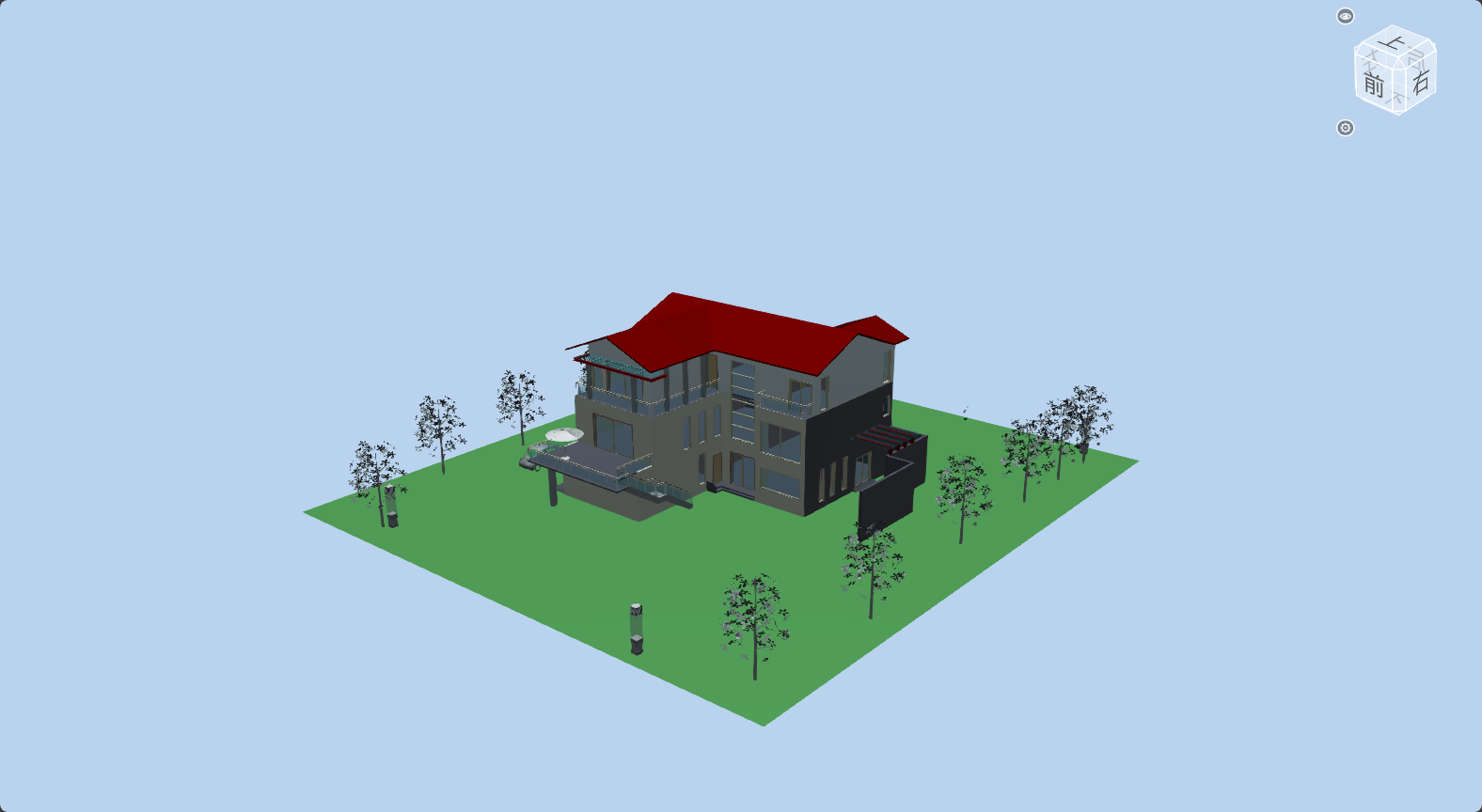
关键代码
你可以通过修改 initOnlyBimMode 中的变量查看修改这些变量带来的效果。
注意,在使用 initOnlyBimMode 时,你必须使用回调函数添加一个模型,并在函数末尾返回该模型的 tileset。
js
// 初始化unicore
let uniCore = new UniCore(config);
uniCore.initOnlyBimMode("unicoreContainer", async () => {

  // 添加一个模型
  let options = {
    id: 'xxx',
    url: 'xxx'
  }
  let tileset = await uniCore.model.createTileset(options.url, options).then(cityModel => {
    return cityModel;
  })

  // 返回该模型tileset
  return tileset;
})
添加 glTF 模型
你也可以使用 initOnlyBimMode 添加 glTF 模型。相关代码及说明如下:
相关代码
vue
<template>
  <div id="unicoreContainer">
    <!-- BIM视图盒子组件开始 -->
    <bcSet ref="bcSetId"></bcSet>
    <!-- BIM视图盒子组件结束 -->
    <!-- 属性窗口组件窗口卡片开始 -->
    <mpInfo ref="mpInfoId"></mpInfo>
    <!-- 属性窗口组件窗口卡片结束 -->
  </div>
</template>

<script>
import { UniCore } from 'unicore-sdk'
import { config } from 'unicore-sdk/unicore.config'
import 'unicore-sdk/Widgets/widgets.css'

import bcSet from '@/components/BimCubeSet/index.vue'; //BIM视图盒子组件
import mpInfo from '@/components/modelPropertyInfo/index'; //属性窗口组件

export default {
  components: {
    bcSet, mpInfo
  },
  // 生命周期 - 挂载完成(可以访问DOM元素)
  mounted () {
    this.init();
  },

  // 方法集合
  methods: {

    /**
    * 通用图形引擎初始化
    */
    init () {

      // 初始化unicore
      let uniCore = new UniCore(config);
      uniCore.initOnlyBimMode("unicoreContainer", async () => {
        let tileset = await uniCore.model.addGltf({
          lon: 0,
          lat: 0,
          height: 0
        }, {
          id: "小别墅",
          name: null,
          url: '../../../assets/gltf/小别墅.glb',
          scale: 6.8,
          property: null
        }).then(cityModel => {
          cityModel.readyEvent.addEventListener(() => {
            this.$refs.bcSetId.show(uniCore, uniCore.position.cartesian3_2axis(cityModel.boundingSphere.center), cityModel.boundingSphere.radius * 3)
          })
          return cityModel;
        })

        // 开启右键交互
        uniCore.interact.setGltfRightClickMenu((property) => this.$refs.mpInfoId.showProps(property));

        return tileset;

      })

    }

  }

}
</script>
<style scoped>
#unicoreContainer {
  position: absolute;
  top: 0;
  left: 0;
  width: 100%;
  height: 100%;
  overflow: hidden;
  background: black;
}
</style>
说明
与添加 3DTiles 模型不同,在添加 glTF 模型时,你需要使用 readyEvent 监听事件以防止模型未加载完毕。
拓展
在 initOnlyBimMode 中关于添加模型的回调函数中,在添加模型的过程中,你可以使用 修改模型位置 的方式修改模型的实际位置(如果模型过于暗,有可能是因为模型处于虚拟地球未被阳光照射到的地方)、模型的旋转角度、模型的缩放大小。如:
js
uniCore.model.changeModelPos(cityModel, [113.12098820449636, 28.256150218457687, 26], [90, 0, 0], [5, 5, 5])