
图层管理树组件
功能介绍
自动获取当前场景所有图元,并能控制对应图元的显隐。
注:该功能使用了 elementUI 库,使用前需安装该库,具体方法见 elementUI 安装 。
注:该功能使用了 vue-giant-tree 库,使用前需安装该库(该组件库有BUG,如遇到报错可尝试先安装该组件库0.1.0版本,后安装该组件库1.0.0版本):
sh
npm install vue-giant-tree@1.0.0不妨通过代码示例在 Vue 中尝试一下:
在线演示
点击 在线链接 以查看在线演示。
组件代码示例
默认路径为 components/LayerControlSet/index.vue
vue
<template>
  <div>
    <!-- 图层管理树 -->
    <el-card class="box-card">
      <div
        id="move-layer"
        class="title"
        @mousedown="mousedown"
        @mouseup="mouseup"
      >
        图层管理树
      </div>
      <hr />
      <tree
        :setting="setting"
        :nodes="nodes"
        @onCheck="onCheck"
        @onCreated="handleCreated"
      />
      <span class="loadingText" v-if="nodes.length === 0"
        >图层管理树加载中..</span
      >
    </el-card>
  </div>
</template>

<script type="text/javascript">
import tree from 'vue-giant-tree'
import * as Cesium from 'cesium'

export default {
  components: {
    tree
  },
  data () {
    return {
      setting: {
        check: {
          enable: true
        },
        data: {
          simpleData: {
            enable: true,
            pIdKey: 'pid'
          }
        },
        view: {
          showIcon: false
        }
      },
      nodes: [],

    }
  },

  methods: {

    createVal () {
      this.nodesList = { 'primitives': [], 'model': [], 'tip': [], 'html': [], 'layer': [] }
    },

    init (uniCore) {
      window.uniCore = uniCore;
      this.nodes = [];
      this.initPrimitiveNodes();
      this.initComplexModelNodes();
      this.initTipNodes();
      this.initHTMLTipNodes();
      this.initLayerNodes();

    },

    initPrimitiveNodes () {
      this.getPrimitive();
      if (this.nodesList['primitives'].length !== 0) this.nodes.push({ checked: true, id: 0, name: "⭐️ 全部图元", open: true, pid: -10000 })
      this.nodesList['primitives'].forEach((e, index) => {
        // 将第一个index设为2开始,将-1留给pid使用
        index = this.idNum + 1
        // 计算使用了多少个idNum
        this.idNum += 1

        let newNode = {};
        newNode.id = index + e;
        newNode.pid = 0; // 图元id为0
        newNode.name = e;
        newNode.checked = true;
        newNode.open = false;
        this.nodes.push(newNode);

      })
    },

    initComplexModelNodes () {
      let myNodes = []
      this.idNum = 0
      const level = []
      const category = []
      const family = []

      if (this.nodesList['model'].length !== 0) this.nodes.push({ checked: true, id: -1, name: "🌳 模型信息树", open: false, pid: -10000 })

      this.nodesList['model'].forEach((e, index) => {
        // 将第一个index设为1开始,将0留给pid使用
        index = this.idNum + 1
        // 计算使用了多少个idNum
        this.idNum += 1


        let newNode = {};
        newNode.id = index;
        newNode.pid = -1; // 模型id为-1
        newNode.name = e.id;
        newNode.checked = true;
        newNode.open = false;
        this.nodes.push(newNode);

        window.uniCore.model.fetchPropertys(e.propertysURL).then((data) => {

          data.forEach((ele, i) => {
            // 这里可以设置radio变量为按楼层过滤、按类名过滤或是按族family过滤
            let radio = '按楼层过滤';

            // 首先将level、category、family依次找到
            let levelRadio, categoryRadio, familyRadio

            if (radio == '按楼层过滤') {
              levelRadio = ele.level
              categoryRadio = ele.category
              familyRadio = ele.family
            } else if (radio == '按类名过滤') {
              levelRadio = ''
              categoryRadio = ele.category
              familyRadio = ele.family
            } else {
              levelRadio = ''
              categoryRadio = ''
              familyRadio = ele.family
            }


            if (levelRadio != '') {
              // 找到level,将没记录的作为父级元素
              if (ele.hasOwnProperty('level') && level.indexOf(index + levelRadio) === -1) {
                myNodes.pid = index
                myNodes.id = myNodes.pid + levelRadio
                myNodes.name = levelRadio
                myNodes.open = false
                myNodes.checked = true
                level.push(myNodes.id)
                this.nodes.push(myNodes)
                myNodes = []
              }
            }

            if (categoryRadio != '') {
              // 找到category,将没记录的作为二级元素
              if (ele.hasOwnProperty('category') && category.indexOf(index + levelRadio + categoryRadio) === -1) {
                myNodes.pid = index + levelRadio
                myNodes.id = myNodes.pid + categoryRadio
                myNodes.name = categoryRadio
                myNodes.open = false
                myNodes.checked = true
                category.push(myNodes.id)
                this.nodes.push(myNodes)
                myNodes = []
              }
            }

            if (familyRadio != '') {
              // 找到family,将没记录的作为三级元素
              if (ele.hasOwnProperty('family') && family.indexOf(index + '' + levelRadio + categoryRadio + familyRadio) === -1) {
                myNodes.pid = index + levelRadio + categoryRadio
                myNodes.id = myNodes.pid + familyRadio
                myNodes.name = familyRadio
                myNodes.open = false
                myNodes.checked = true
                family.push(myNodes.id)
                this.nodes.push(myNodes)
                myNodes = []
              }
            }

            // 将所有的子项都作为四级元素,自动匹配对应的父级元素
            const item = []
            item.pid = index + levelRadio + categoryRadio + familyRadio
            item.id = item.pid + ele.name
            item.open = false
            item.name = ele.name
            item.checked = true
            item.instanceid = ele._BATCHID === undefined ? ele.ElementID : ele._BATCHID;
            this.nodes.push(item)

          })

        })


      });

    },

    initTipNodes () {
      this.getTip();
      if (Object.keys(this.nodesList['tip']).length !== 0) this.nodes.push({ checked: true, id: -2, name: "🌳 普通标签信息树", open: false, pid: -10000 })
      Object.entries(this.nodesList['tip']).forEach((e, index) => {
        // 将第一个index设为2开始,将-1留给pid使用
        index = this.idNum + 1
        // 计算使用了多少个idNum
        this.idNum += 1

        let newNode = {};
        newNode.id = index + "->tip<-" + e[0];
        newNode.pid = -2; // 标签id为-2
        newNode.name = e[0];
        newNode.checked = true;
        newNode.open = false;
        this.nodes.push(newNode);

        e[1].forEach((ele) => {
          let newNode = {};
          newNode.pid = index + "->tip<-" + e[0]; // 标签id为-2
          newNode.id = newNode.pid + ele.text || ele.id;
          newNode.name = ele.text || ele.id;
          newNode.checked = true;
          newNode.open = false;
          this.nodes.push(newNode);
        })


      });

    },

    initHTMLTipNodes () {
      this.getHTMLTip();
      if (this.nodesList['html'].length !== 0) this.nodes.push({ checked: true, id: -3, name: "📖 HTML标签列表", open: false, pid: -10000 })

      this.nodesList['html'].forEach((e, index) => {
        // 将第一个index设为2开始,将-1留给pid使用
        index = this.idNum + 1
        // 计算使用了多少个idNum
        this.idNum += 1

        let newNode = {};
        newNode.id = index + e.id;
        newNode.pid = -3; // HTMLid为-3
        newNode.name = e.id;
        newNode.checked = true;
        newNode.open = false;
        this.nodes.push(newNode);

      })

    },

    initLayerNodes () {
      this.getLayer();
      if (this.nodesList['layer'].length !== 0) this.nodes.push({ checked: true, id: -4, name: "🌎 GIS数据", open: false, pid: -10000 })

      this.nodesList['layer'].forEach((e, index) => {
        // 将第一个index设为2开始,将-1留给pid使用
        index = this.idNum + 1
        // 计算使用了多少个idNum
        this.idNum += 1

        let newNode = {};
        newNode.id = index + e.id;
        newNode.pid = -4; // 底图数据id为-4
        newNode.name = e.id;
        newNode.checked = e.checked;
        newNode.open = false;
        this.nodes.push(newNode);

      })

    },

    getPrimitive () {
      this.nodesList['primitives'] = window.uniCore.model.getPrimitivesName();
    },

    getTip () {
      /**
       * 标签
       */
      let idList = [];
      viewer.scene.primitives._primitives.forEach((e) => {
        try {
          for (let i of e._labels) {

            if (idList[i._id] === undefined) {
              idList[i._id] = []
            }
            idList[i._id].push({ 'text': i._text, 'tile': i })
          }
        } catch (error) { }
      })

      this.nodesList['tip'] = idList;

    },

    getHTMLTip () {
      /**
       * 标签
       */
      let idList = [];


      // 考虑 HTML 标签
      if (window.htmlTipList && window.htmlTipList.length !== 0) {
        window.htmlTipList.forEach(e => {
          idList.push({ 'id': e, 'dom': document.getElementById(e) })
        })
      }

      this.nodesList['html'] = idList;

    },

    getLayer () {
      // 底图
      window.viewer.imageryLayers._layers.forEach((e, index) => {
        this.nodesList['layer'].push({ 'id': '底图数据-' + (index + 1), 'tile': e, 'checked': true });

      })
      // 地形
      if (!!window.viewer.terrainProvider) {
        this.nodesList['layer'].push({ 'id': '地形数据', 'tile': window.viewer.terrainProvider, 'checked': true });
        window.terrainProvider = window.viewer.terrainProvider;
      }

      // 自带天体、天空盒
      this.nodesList['layer'].push({ 'id': '月球', 'tile': window.viewer.scene.moon, 'checked': window.viewer.scene.moon.show });
      this.nodesList['layer'].push({ 'id': '太阳', 'tile': window.viewer.scene.sun, 'checked': window.viewer.scene.sun.show });
      this.nodesList['layer'].push({ 'id': '雾气', 'tile': window.viewer.scene.fog, 'checked': window.viewer.scene.fog.show });
      this.nodesList['layer'].push({ 'id': '天空盒', 'tile': window.viewer.scene.skyBox, 'checked': window.viewer.scene.skyBox.show });
      this.nodesList['layer'].push({ 'id': '大气层', 'tile': window.viewer.scene.skyAtmosphere, 'checked': window.viewer.scene.skyAtmosphere.show });
      this.nodesList['layer'].push({ 'id': '地球', 'tile': window.viewer.scene.globe, 'checked': window.viewer.scene.globe.show });

    },

    onCheck (evt, treeId, treeNode) {
      let that = this;
      getParentNodes(treeNode);
      function getParentNodes (node) {
        if (node && node.getParentNode() !== null) {
          getParentNodes(node.getParentNode());
        } else {
          let parentNode = { "id": node.id, "name": node.name };

          if (parentNode.id === 0) {
            // 全部图元
            let primitivesShowList = [];
            node.children.forEach(nodes => {
              if (nodes.checked) primitivesShowList.push(nodes.name);
            })
            window.uniCore.model.setPrimitivesShow(primitivesShowList)


          } else if (parentNode.id === -1) {
            // 模型信息树

            if (treeNode.id === parentNode.id) {
              // 相当于全选的时候
              treeNode.children.forEach(nodes => {
                that.setModelTree(nodes);
              })
            } else {
              // 只选择了信息树的其中一个模型的时候
              that.setModelTree(treeNode);
            }
          } else if (parentNode.id === -2) {
            // 普通标签信息树
            that.setTipTree(treeNode);

          } else if (parentNode.id === -3) {
            // HTML标签信息树
            that.setHTMLTipTree(treeNode);

          } else if (parentNode.id === -4) {
            // 底图数据
            that.setLayer(treeNode);
          }

        }
      }


    },

    /**
     * 设置模型信息树
     */
    setModelTree (treeNode) {
      // 数组去重
      function handleArr (arr) {
        return ([...new Set(arr)])
      }

      // 找到节点下所有的子节点
      let findChild = function (array) {
        for (let i = 0; i < array.length; i++) {
          if (array[i].hasOwnProperty("children")) {
            findChild(array[i].children)
          } else {
            allClickInstanceid.push(array[i].instanceid)
          }
        }
      }

      // 递归找到节点最上层父节点
      let findParent = function (array) {
        return array.getParentNode().getParentNode() === null ? array : findParent(array.getParentNode());

      }

      // 最新返回的treeNode所点击到的所有elementID
      let allClickInstanceid = []

      if (treeNode.hasOwnProperty("children")) {
        findChild(treeNode.children)
      } else {
        allClickInstanceid.push(treeNode.instanceid)
      }

      // 以下代码将应用上面所得到的id序列进行显隐操作
      // 所展示的模型ID,依据为initNodes函数的index,据此找到allClickInstanceid对应的哪个模型,应对多模型的信息树情况
      let parentId = findParent(treeNode).id;
      // if (parentId === null)
      let parentTileset = this.nodesList['model'][parentId - 1].tileset;

      // 初始化下selectElementID
      window.selectElementID === undefined ? window.selectElementID = [] : window.selectElementID;

      let hideElementList = window.selectElementID.find(e => { return e.id === parentTileset.debugPickedTile.id })
      if (hideElementList === undefined) {
        window.selectElementID.push({ id: parentTileset.debugPickedTile.id, eleID: [] })
        hideElementList = window.selectElementID.find(e => { return e.id === parentTileset.debugPickedTile.id })
      }

      // 如果最新返回的treeNode为选中状态,那里面包含的elementID对应的构件都需要显示
      if (!treeNode.checked) {
        hideElementList.eleID.push(...allClickInstanceid)
        // 数组去重
        hideElementList.eleID = handleArr(hideElementList.eleID);


      } else {
        // 数组去重
        hideElementList.eleID = handleArr(hideElementList.eleID);

        // 如果最新返回的treeNode为取消选中状态,那里面包含的elementID对应的构件都需要隐藏
        allClickInstanceid.forEach(e => {
          hideElementList.eleID.splice(hideElementList.eleID.indexOf(e), 1)
        })

      }

      // 找到与elementID关联的构件方法
      parentTileset.tileVisible.addEventListener((tile) => {
        let content = tile.content;
        let featuresLength = content.featuresLength;

        for (let i = 0; i < featuresLength; i++) {
          let feature = content.getFeature(i);
          let elementId = feature.getProperty("id")
          if (hideElementList.eleID.indexOf(elementId) !== -1) {
            // 获得与elementID关联的构件feature
            feature.show = false;
          } else {
            feature.show = true;
          }
        }

        // 优化性能,自动清除事件
        setTimeout(() => {
          parentTileset.tileVisible._listeners = [];
          parentTileset.tileVisible._scopes = [];
        })
      });
    },

    /**
     * 设置标签构件树
     */
    setTipTree (treeNode) {
      // 找到节点下所有的子节点
      let allNode = [];
      let findChild = function (array) {

        if (array.hasOwnProperty("children")) {
          for (let i = 0; i < array.children.length; i++) {
            findChild(array.children[i])
          }
        } else {
          allNode.push({ "id": array.pid.split('->tip<-')[1], "text": array.name, "checked": array.checked })
        }

      }

      findChild(treeNode)

      allNode.forEach(e => {
        window.uniCore.tip.hideTipByIDText(e.id, e.text, !e.checked);
      })


    },

    /**
     * 设置HTML标签构件树
     */
    setHTMLTipTree (treeNode) {
      // 找到节点下所有的子节点
      let allNode = [];
      let findChild = function (array) {

        if (array.hasOwnProperty("children")) {
          for (let i = 0; i < array.children.length; i++) {
            findChild(array.children[i])
          }
        } else {
          allNode.push({ "id": array.name, "checked": array.checked })
        }

      }

      findChild(treeNode)

      allNode.forEach(e => {
        // 防止出现空点
        try {
          document.getElementById(e.id).style.display = e.checked === true ? "block" : "none";
        } catch (error) {

        }
      })
    },

    /**
     * 设置底图数据
     */
    setLayer (treeNode) {
      let that = this;
      // 找到节点下所有的子节点
      let allNode = [];
      let findChild = function (array) {

        if (array.hasOwnProperty("children")) {
          for (let i = 0; i < array.children.length; i++) {
            findChild(array.children[i])
          }
        } else {
          allNode.push({ "id": array.name, "tile": that.nodesList['layer'].find(e => { if (e.id === array.name) return e })?.tile, 'checked': array.checked })
        }

      }

      findChild(treeNode)

      allNode.forEach(async e => {
        if (e.id === '地形数据') {
          // console.log(window.viewer.terrainProvider);
          window.viewer.terrainProvider = e.checked === true ? window.terrainProvider : new Cesium.EllipsoidTerrainProvider({});
        } else if (e.id.split('-')[0] === '底图数据') {
          // 底图数据
          e.tile.show = e.checked
        } else {
          // 天体、天空盒
          e.tile.show = e.checked
        }
      })

    },

    handleCreated: function (ztreeObj) {
      this.ztreeObj = ztreeObj;
      // onCreated 中操作ztreeObj对象展开第一个节点
      ztreeObj.expandNode(ztreeObj.getNodes()[0], true);
    },

    /**
 * 鼠标与窗口拖动相关
 */
    mousedown (event, id) {
      if (document.elementFromPoint(event.clientX, event.clientY).id === 'move-layer') {
        this.selectElement = document.elementFromPoint(event.clientX, event.clientY).parentNode.parentNode;
        document.querySelectorAll('.box-card').forEach((e) => {
          e.style.zIndex = 1000;
        })
        this.selectElement.style.zIndex = 1001;
        var div1 = this.selectElement
        this.selectElement.style.cursor = 'move'
        this.isDowm = true
        var distanceX = event.clientX - this.selectElement.offsetLeft
        var distanceY = event.clientY - this.selectElement.offsetTop
        document.onmousemove = function (ev) {
          var oevent = ev || event
          div1.style.left = oevent.clientX - distanceX + 'px'
          div1.style.top = oevent.clientY - distanceY + 'px'
        }
        document.onmouseup = function () {
          document.onmousemove = null
          document.onmouseup = null
          div1.style.cursor = 'default'
        }
      }

    },
    //鼠标抬起
    mouseup () {
      this.isMove = false;
      this.selectElement = "null"
    }

  },

  mounted () {
    this.createVal();
  },
}
</script>

<style rel="stylesheet/scss" lang="scss" scoped>
::v-deep .el-card__body {
  padding: 20px 20px 0 20px;
}

::v-deep .box-card::-webkit-scrollbar {
  display: none;
}
::v-deep .box-card {
  position: absolute;
  top: 3%;
  left: 3%;
  z-index: 1;
  background: rgb(26 26 26 / 83%);
  border: 1px solid rgba(255, 255, 255, 0.3);
  box-shadow: 0px 24px 54px 0px rgba(35, 41, 50, 0.5);
  border-radius: 10px;
  padding: 0 24px 24px 0px;
  margin-bottom: 12px;
  -webkit-backdrop-filter: blur(10px);
  backdrop-filter: blur(10px);
  max-width: 370px;
  max-height: 70%;
  min-width: 250px;
  overflow-y: scroll;
  transition: none;
  user-select: none;
  .el-table {
    border-radius: 15px;
  }

  .title {
    font-size: 18px;
    font-weight: bold;
    color: #fefeff;
    display: block;
    margin-left: 24px;
    margin-bottom: 10px;
    user-select: none;
    overflow: hidden;
    cursor: move;
  }

  hr {
    margin-left: 24px;
    margin-bottom: 10px;
    border: none;
    border-bottom: 1px solid #ffffff1a;
  }

  .button {
    display: inline-flex;
    margin: 5px 10px;
    color: white;
    background: #ffffff00;
    border-radius: 5px;
    cursor: pointer;
  }

  .loadingText {
    color: #adadad94;
    margin-left: 24px;
  }
}

::v-deep .ztree li a {
  color: #e1e1e1;
}
</style>
调用代码示例
vue
<template>
  <div id="unicoreContainer">
    <!-- 图层管理树卡片开始 -->
    <lcSet ref="lcSetId"></lcSet>
    <!-- 图层管理树卡片结束 -->
    <!-- HTML 标签测试开始 -->
    <div id="test">你可以将任意HTML元素固定在某处</div>
    <div id="test2">这是第二个HTML标签</div>
    <!-- HTML 标签测试结束 -->
  </div>
</template>

<script>
import { UniCore } from 'unicore-sdk'
import { config } from 'unicore-sdk/unicore.config'
import 'unicore-sdk/Widgets/widgets.css'
import lcSet from '@/components/LayerControlSet/index.vue'; //图层管理树组件

import * as Cesium from 'cesium'

export default {

  components: {
    lcSet
  },
  // 生命周期 - 挂载完成(可以访问DOM元素)
  mounted () {
    this.init();
  },

  // 方法集合
  methods: {

    /**
    * 通用图形引擎初始化
    */
    init () {

      // 初始化UniCore

      // 目前采用Cesium的地形&底图数据,这里配置Cesium的token
      let accessToken = "eyJhbGciOiJIUzI1NiIsInR5cCI6IkpXVCJ9.eyJqdGkiOiIxNjEwMzI4My01MjBmLTQzYzktOGZiMS0wMDRhZjE0N2IyMGIiLCJpZCI6MTc1NzkyLCJpYXQiOjE3MTM3NzQ3OTh9.zU-R4MNvHr8rvn1v28PQfDImyutnpPF2lmEgGeSPckQ";
      // 初始化unicore
      let uniCore = new UniCore(config, accessToken);
      uniCore.init("unicoreContainer");
      window.uniCore = uniCore;
      let viewer = uniCore.viewer;

      // 视角初始化
      uniCore.position.buildingPosition(viewer, [113.12380548015745, 28.250758831850005, 700], -20, -45, 1);

      // 模型示例1
      const options = {
        id: '小别墅1号示例',
        url: '../../assets/3Dtiles/sample3_方法2_小别墅属性(1)/tileset.json',
        propertysURL: '../../assets/3Dtiles/sample3_方法2_小别墅属性(1)/01 小别墅.json'
      }
      //加载3dtiles
      uniCore.model.createTileset(options.url, options, (tileset) => {
        let customShader = new Cesium.CustomShader({
          // lightingModel: Cesium.LightingModel.UNLIT,
          lightingModel: Cesium.LightingModel.PBR,
          //片元着色器
          fragmentShaderText: `
          void fragmentMain(FragmentInput fsInput, inout czm_modelMaterial material) {
            vec3 positionMC = fsInput.attributes.positionMC;
            //此处以下为光线效果
            material.diffuse += material.diffuse * (1.0);
          }`
        })

        tileset.customShader = customShader
      }).then(cityModel => {
        uniCore.model.changeModelPos(cityModel, [113.12098820449636, 28.256150218457687, 130], [0, 0, 0], [23.8, 23.8, 23.8])

        // 绑定信息树
        let modelOption = {
          ...options,
          tileset: cityModel
        }
        this.$refs.lcSetId.nodesList['model'].push(modelOption)

      })

      // 模型示例2
      const options_2 = {
        id: '小别墅2号示例',
        url: '../../assets/3Dtiles/sample3_方法2_小别墅属性(1)/tileset.json',
        propertysURL: '../../assets/3Dtiles/sample3_方法2_小别墅属性(1)/01 小别墅.json'
      }
      //加载3dtiles
      uniCore.model.createTileset(options_2.url, options_2).then(cityModel => {
        uniCore.model.changeModelPos(cityModel, [113.11098820449636, 28.257150218457687, 130], [0, 0, 0], [23.8, 23.8, 23.8])

        // 绑定信息树
        let modelOption = {
          ...options_2,
          tileset: cityModel
        }
        this.$refs.lcSetId.nodesList['model'].push(modelOption)
      })

      // 开启右键菜单、点击高亮、属性property
      uniCore.interact.setTilesRightClickMenu([{
        id: '小别墅1号示例',
        url: '../../assets/3Dtiles/sample3_方法2_小别墅属性(1)/tileset.json',
        propertysURL: '../../assets/3Dtiles/sample3_方法2_小别墅属性(1)/01 小别墅.json'
      }, {
        id: '小别墅2号示例',
        url: '../../assets/3Dtiles/sample3_方法2_小别墅属性(1)/tileset.json',
        propertysURL: '../../assets/3Dtiles/sample3_方法2_小别墅属性(1)/01 小别墅.json'
      }], (property) => console.log(property), (pickObj) => console.log(pickObj), () => console.log("BIM"), () => console.log("GIS"));


      // 加入墙体图元 primitives
      uniCore.model.paintWall("墙体测试", [[113.12380548015745, 28.260758831850005], [113.12380548015745, 28.240758831850005]], 500, 100, "#e46962")
      uniCore.model.paintLine("线条测试", [[113.12123548015745, 28.280758831850005], [113.12380548015745, 28.240758831850005], [113.12070548015745, 28.240758831850005]], 75, "#c3e88d", 5)
      uniCore.model.createMaterialLine([113.12123548015745, 28.255978831850005, 50], [113.12123548015745, 28.245978831850005, 80])

      // 加入水流特效 entities
      uniCore.model.createMaterialLine([113.12123548015745, 28.255978831850005, 50], [113.12123548015745, 28.245978831850005, 80])

      // 加入普通标签
      uniCore.tip.createTip('标签组测试1', "普通标签", [113.12380548015745, 28.255758831850005, 150], null, '#0361f3', 1, [250, 1.0, 550, 1.0], [250000, 1.0, 5500000, 0.0])

      // 加入带有点击事件的标签
      uniCore.tip.createTip('标签组测试1', "可点击标签-1", [113.12390548015745, 28.255568831850005, 100], () => { alert("你点击了 可点击标签-1") }, '#f3125f', 1, [250, 1.0, 550, 1.0], [250000, 1.0, 5500000, 0.0])
      uniCore.tip.createTip('标签组测试2', "可点击标签-2", [113.12374548015745, 28.256758831850005, 100], () => { alert("可点击标签-2 被你点击到了~") }, '#f3125f', 1, [250, 1.0, 550, 1.0], [250000, 1.0, 5500000, 0.0])

      // 加入 HTML 标签
      uniCore.tip.createHtmlTip("test", [113.12098820449636, 28.256150218457687, 130], false)
      uniCore.tip.createHtmlTip("test2", [113.12374548015745, 28.256150218457687, 50], false)


      // 原本设计是作为开关调用的,这里使用定时器先展示功能
      setTimeout(() => {
        // 图层树初始化
        this.$refs.lcSetId.init(uniCore);
      }, 1000)

    }

  }

}
</script>
<style scoped>
#unicoreContainer {
  position: absolute;
  top: 0;
  left: 0;
  width: 100%;
  height: 100%;
  overflow: hidden;
  background: black;
}
#test {
  position: absolute;
  font-size: 13px;
  background: #fff;
  border-radius: 15px;
  padding: 5px 20px;
  cursor: pointer;
  user-select: none;
  z-index: 999;
}
#test2 {
  position: absolute;
  font-size: 13px;
  background: #fff;
  border-radius: 15px;
  padding: 5px 20px;
  cursor: pointer;
  user-select: none;
  z-index: 999;
}
</style>
示例运行结果
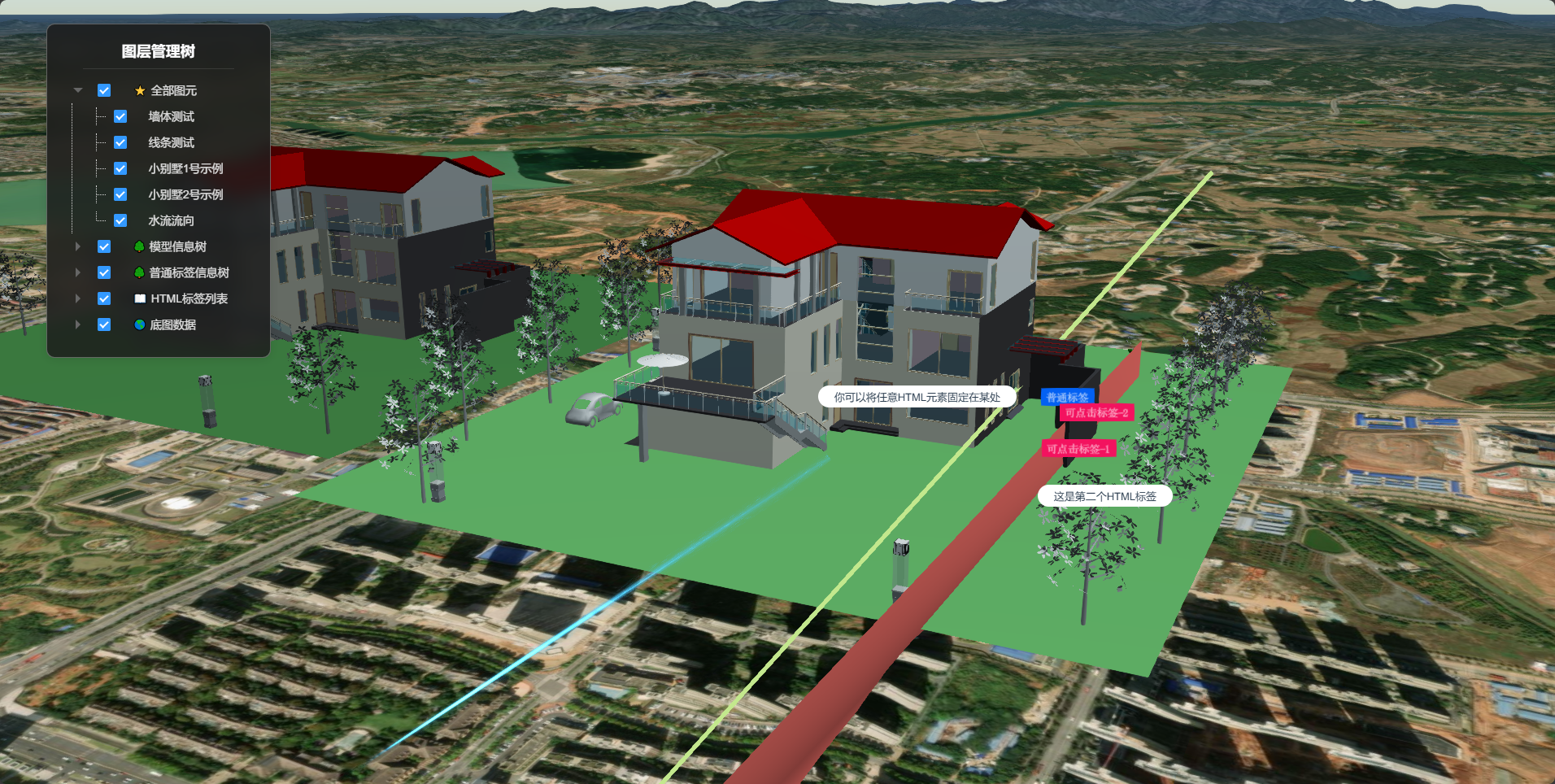
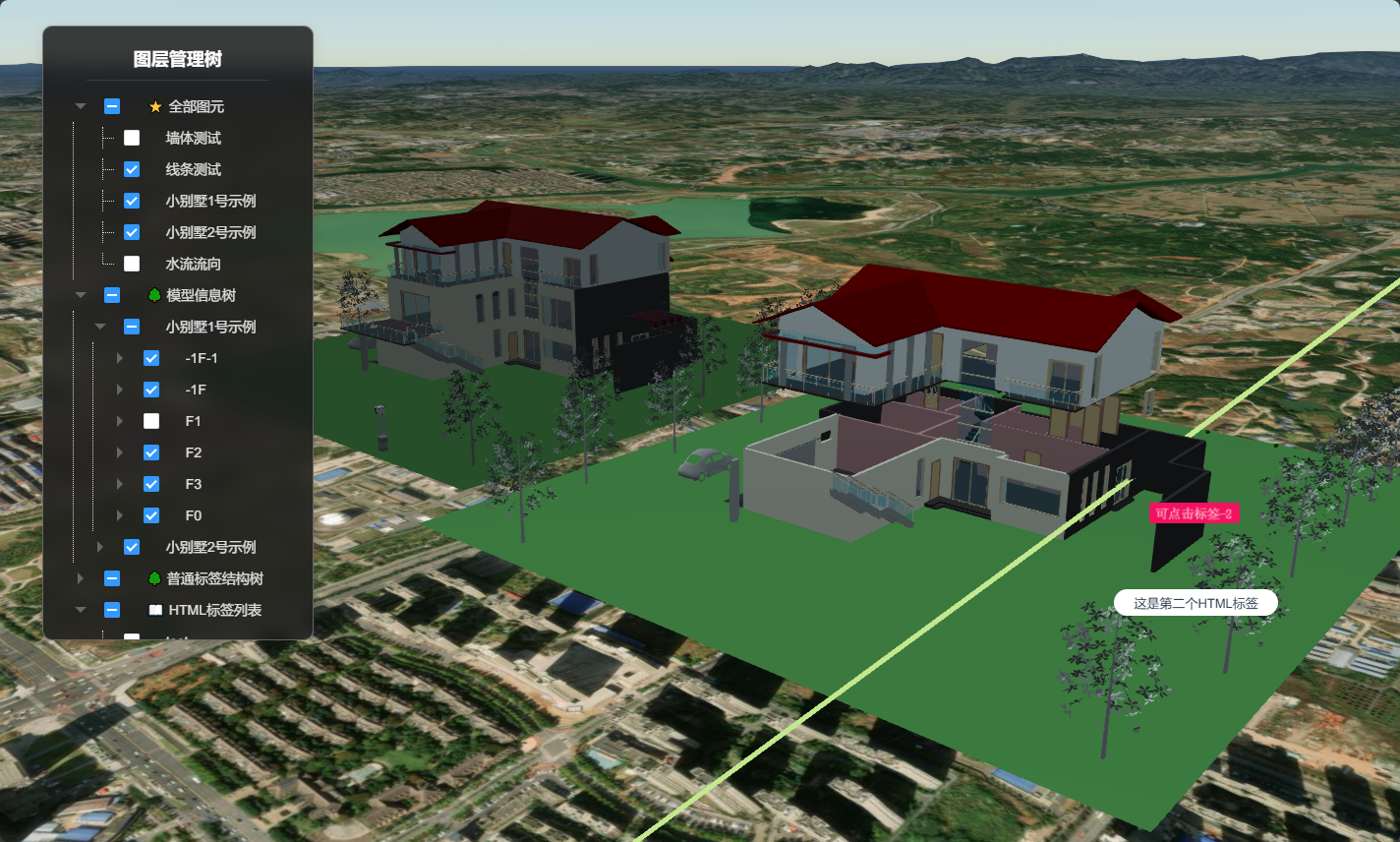
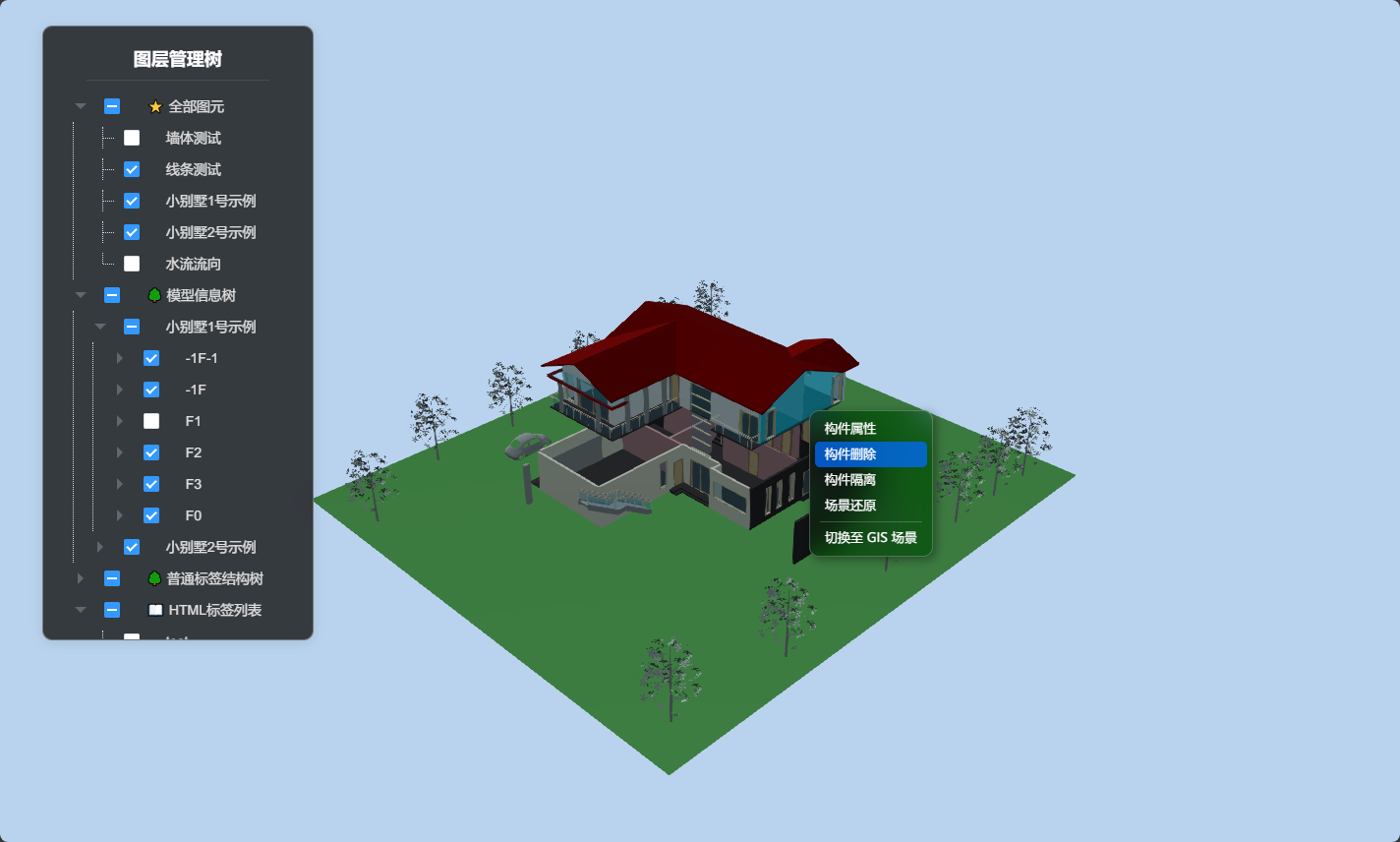
调用代码示例中的关键代码
模型信息树需在调用代码中绑定:
js
// 绑定信息树
let modelOption = {
  ...options,
  tileset: cityModel
}
this.$refs.lcSetId.nodesList['model'].push(modelOption)
调用初始化(需要将实例化的uniCore传入):
js
this.$refs.lcSetId.init(uniCore);拓展
本文在加载模型时还使用了 利用回调函数改变模型着色器 的方法调整了单独示例模型的亮度,使其展示效果更好。