
模型属性窗口组件
功能介绍
结合 3DTiles 模型开启交互事件 使用模型属性窗口组件。
由于本示例组件方法依赖 jQuery ,在使用前注意引入该第三方库。
注:该功能使用了 elementUI 库,使用前需安装该库,具体方法见 elementUI 安装 。
不妨通过代码示例在 Vue 中尝试一下:
在线演示
点击 在线链接 以查看在线演示。
组件代码示例
默认路径为 components/modelPropertyInfo/index.vue
vue
<template>
  <div>
    <!-- 属性窗口组件 -->
    <el-card class="box-card" v-show="tilespanelShow">
      <div
        id="move-layer"
        class="title"
        @mousedown="mousedown"
        @mouseup="mouseup"
      >
        属性窗口
      </div>
      <hr />

      <!-- 属性3dtiles-panel开始 -->
      <div class="tilespanel" style="z-index: 999999; left: 10px">
        <div class="tilesclose" @click="tilespanelShow = !tilespanelShow">
          X
        </div>
        <div class="tilespanel-body">
          <div class="tilespanel-tips">"请选择一个构件,以查看属性"</div>
          <div class="tilespanel-container scroll-bar">
            <table class="tilespanel-table"></table>
          </div>
        </div>
        <div class="resize"></div>
      </div>
      <!-- 属性3dtiles-panel结束 -->
    </el-card>
  </div>
</template>

<script type="text/javascript">

import $ from 'jquery'; // 引入jQuery

export default {
  data () {
    return {
      tilespanelShow: false,
    }
  },

  methods: {
    showProps (node) {
      let panel = $('.tilespanel');
      let table = panel.find('.tilespanel-table');
      let panel_tips = panel.find('.tilespanel-tips');
      if (node) { //选到构件
        //$('.panel').show();
        panel_tips.hide(); //提示隐藏
        panel.show();
        table.empty(); //清空
        let keys = { 'ElementID': true, 'Parameters': false, 'UniqueId': true, 'category': true, 'classfication': false, 'family': true, 'level': true, 'name': true }
        //添加构件名称、id等
        for (let key in node) {
          if (!keys[key]) continue
          let tr_content = document.createElement('tr')
          $(tr_content).addClass('group-content');
          $(table).append(tr_content);
          let td_key = document.createElement('td'); //参数-键
          $(td_key).addClass('key')
          $(td_key).text(key); //参数-name
          $(tr_content).append(td_key);
          let td_value = document.createElement('td'); //参数-值
          $(td_value).addClass('value');
          let value = node[key]; //属性,可能多个
          $(td_value).text(value); //参数-value
          $(tr_content).append(td_value);
        }

        //遍历添加属性组
        let groups = node.Parameters; //数组[{groupName: ,parameters:[{name:title,value},{}]}]
        for (let i = 0, length = groups.length; i < length; i++) {

          let tbody = document.createElement('tbody');
          $(tbody).addClass('group');
          table.append(tbody);
          //遍历键值对,创建tr
          let group = groups[i];
          let groupName = group.GroupName; //参数
          let tr_title = document.createElement('tr'); //组名


          let hasTitle = false;
          let parameters = group.Parameters; //组内参数键值对
          for (let j = 0; j < parameters.length; j++) {
            //添加分组:组名
            // if (parameters.flags[j]) continue;
            if (!hasTitle) {
              hasTitle = true;
              $(tr_title).addClass('group-title')
              $(tbody).append(tr_title);
              let td_title = document.createElement('td');
              $(td_title).attr('colspan', '2');
              $(tr_title).append(td_title);
              let i_title = document.createElement('i');
              $(i_title).addClass('icon');
              $(i_title).text(`  ` + groupName)
              $(td_title).append(i_title);
            }
            //添加:属性-值
            let tr_content = document.createElement('tr')
            $(tr_content).addClass('group-content');
            $(tbody).append(tr_content);
            let td_key = document.createElement('td'); //参数-键
            $(td_key).addClass('key')
            $(td_key).text(parameters[j].name); //参数-name
            $(tr_content).append(td_key);
            let td_value = document.createElement('td'); //参数-值
            $(td_value).addClass('value');
            let value = parameters[j].value; //属性,可能多个

            $(td_value).text(value); //参数-value
            $(tr_content).append(td_value);
          }
          //3.属性列表折叠展开
          $(tr_title).click(function () {
            $(this).nextAll().toggle();
            $(this).find('i').toggleClass('iconClose')
          })
        }
      } else {
        panel_tips.show(); //提示
      }

      this.tilespanelShow = true;

    },

    /**
 * 鼠标与窗口拖动相关
 */
    mousedown (event, id) {
      if (document.elementFromPoint(event.clientX, event.clientY).id === 'move-layer') {
        this.selectElement = document.elementFromPoint(event.clientX, event.clientY).parentNode.parentNode;
        document.querySelectorAll('.box-card').forEach((e) => {
          e.style.zIndex = 1000;
        })
        this.selectElement.style.zIndex = 1001;
        var div1 = this.selectElement
        this.selectElement.style.cursor = 'move'
        this.isDowm = true
        var distanceX = event.clientX - this.selectElement.offsetLeft
        var distanceY = event.clientY - this.selectElement.offsetTop

        document.onmousemove = function (ev) {
          var oevent = ev || event
          div1.style.left = oevent.clientX - distanceX + 'px'
          div1.style.top = oevent.clientY - distanceY + 'px'
        }
        document.onmouseup = function () {
          document.onmousemove = null
          document.onmouseup = null
          div1.style.cursor = 'default'
        }
      }

    },
    //鼠标抬起
    mouseup () {
      this.isMove = false;
      this.selectElement = "null"
    }


  }
}
</script>

<style rel="stylesheet/scss" lang="scss" scoped>
::v-deep .box-card {
  position: absolute;
  top: 3%;
  left: 3%;
  width: 300px;
  z-index: 1;
  background: rgb(26 26 26 / 83%);
  border: 1px solid rgba(255, 255, 255, 0.3);
  box-shadow: 0px 24px 54px 0px rgba(35, 41, 50, 0.5);
  border-radius: 15px;
  padding: 20px 24px 20px 24px;
  margin-bottom: 12px;
  -webkit-backdrop-filter: blur(10px);
  backdrop-filter: blur(10px);
  transition: none;
user-select: none;
  .title {
    font-size: 18px;
    font-weight: bold;
    color: #fefeff;
    display: block;
    margin-bottom: 10px;
    user-select: none;
    overflow: hidden;
    cursor: move;
  }

  hr {
    margin-bottom: 10px;
    border: none;
    border-bottom: 1px solid #ffffff1a;
  }

  * {
    margin: 0;
    padding: 0;
  }

  /* 2.2属性面板开始 */
  .tilespanel {
    width: 100%;
    height: 416px;
    overflow: hidden;
    border: 1px solid #333;
    font-size: 14px;
    line-height: 1.5;
  }

  .tilespanel .tilestitle {
    height: 20px;
    background-color: rgba(0, 0, 0, 0.88);
    padding: 10px 30px 10px 10px;
    line-height: 20px;
    font-size: 14px;
    border-bottom: 1px solid #666;
    color: white;
    cursor: move;
  }

  .tilespanel .tilesclose {
    position: absolute;
    top: 10px;
    right: 10px;
    width: 16px;
    height: 16px;
    cursor: pointer;
    z-index: 99;
    font-size: 16px;
    line-height: 16px;
    color: white;
  }

  .tilespanel .tilespanel-body {
    width: 100%;
    height: 100%;
    color: #fff;
    overflow: hidden;
  }

  .tilespanel .tilespanel-body .tilespanel-tips {
    font-size: 12px;
    margin-top: 36px;
    text-align: center;
    color: #999;
    display: block;
  }

  .tilespanel .tilespanel-container {
    width: 100%;
    height: 100%;
    overflow-y: auto;
    position: relative;
  }

  .tilespanel .scroll-bar::-webkit-scrollbar {
    width: 8px;
    height: 8px;
    border-radius: 5px;
  }

  ::-webkit-scrollbar-thumb {
    border-radius: 5px;
    background-color: rgba(153, 153, 153, 0.8);
  }

  ::-webkit-scrollbar-track {
    border-radius: 5px;
    background-color: #6c717966;
  }

  .tilespanel .tilespanel-table {
    width: 100%;
    border-collapse: collapse;
    font-size: 12px;
    border-spacing: 0;
    display: table;
    text-indent: initial;
    color: #fff;
  }

  .tilespanel .tilespanel-table tr {
    display: table-row;
    vertical-align: inherit;
    cursor: default;
  }

  .tilespanel .tilespanel-table td {
    display: table-cell;
    vertical-align: middle;
    line-height: 20px;
    padding: 5px;
    border: 1px solid #3f3f3f;
  }

  .tilespanel .tilespanel-table .group .group-title {
    background-color: rgba(85, 85, 85, 0.45);
  }

  .tilespanel .tilespanel-table .group .group-title td {
    color: #fff;
    border-bottom: 1px solid #666;
  }

  .tilespanel .tilespanel-table .group .group-title td .icon {
    position: relative;
    float: left;
    font-style: normal;
    padding: 0px;
  }

  .tilespanel .tilespanel-table .group .group-title td .icon::before {
    content: '';
    display: inline-block;
    width: 0;
    height: 0;
    border-right: 8px solid #666;
    border-top: 8px solid transparent;
  }

  .iconClose::before {
    transform: rotate(-40deg);
    -webkit-transform: rotate(-40deg);
    -ms-transform: rotate(-40deg);
  }

  .tilespanel .tilespanel-table .group .key {
    color: #999;
    padding-left: 26px;
    width: 40%;
  }

  .tilespanel .tilespanel-table .group .value {
    color: #ccc;
  }

  .tilespanel .resize {
    height: 8px;
    width: 8px;
    position: absolute;
    bottom: 0;
    right: 0;
    z-index: 9;
  }

  .tilespanel .resize::after {
    display: block;
    float: right;
    content: '';
    width: 8px;
    height: 8px;
    background: url(data:image/png;base64,iVBORw0KGgoAAAANSUhEUgAAAAYAAAAGCAYAAADgzO9IAAAABGdBTUEAALGPC/xhBQAAAF5JREFUCB1jYEADq1at4r927dpOJmRxkKC+vv5ORkbGG3BxkODNmzdPXL9+fSJWwf///zNfvnx5CTNM+79//05qaGgUAXUtBeoQYARZBDJTU1MzH6SSiYlJaMaMGYEA7E42FFiHq5AAAAAASUVORK5CYII=)
      no-repeat;
    cursor: nw-resize;
  }

  /* 2.2属性面板结束 */
}
</style>
调用代码示例
vue
<template>
  <div id="unicoreContainer">
    <!-- 属性窗口组件窗口卡片开始 -->
    <mpInfo ref="mpInfoId"></mpInfo>
    <!-- 属性窗口组件窗口卡片结束 -->
  </div>
</template>

<script>
import { UniCore } from 'unicore-sdk'
import { config } from 'unicore-sdk/unicore.config'
import 'unicore-sdk/Widgets/widgets.css'
import mpInfo from '@/components/modelPropertyInfo/index'; //属性窗口组件

export default {
  components: {
    mpInfo
  },
  // 生命周期 - 挂载完成(可以访问DOM元素)
  mounted () {
    this.init();
  },

  // 方法集合
  methods: {

    /**
    * 通用图形引擎初始化
    */
    init () {

      // 初始化UniCore

      // 目前采用Cesium的地形&底图数据,这里配置Cesium的token
      let accessToken = "eyJhbGciOiJIUzI1NiIsInR5cCI6IkpXVCJ9.eyJqdGkiOiIxNjEwMzI4My01MjBmLTQzYzktOGZiMS0wMDRhZjE0N2IyMGIiLCJpZCI6MTc1NzkyLCJpYXQiOjE3MTM3NzQ3OTh9.zU-R4MNvHr8rvn1v28PQfDImyutnpPF2lmEgGeSPckQ";
      // 初始化unicore
      let uniCore = new UniCore(config, accessToken);
      uniCore.init("unicoreContainer");

      // 视角初始化
      uniCore.position.buildingPosition(uniCore.viewer, [113.12380548015745, 28.250758831850005, 700], -20, -45, 1);

      let options = {
        id: '城市白膜'
      }
      //加载3dtiles
      uniCore.model.createTileset('../../assets/3Dtiles/sample3_方法2_小别墅属性(1)/tileset.json', options).then(cityLeft => {
        uniCore.model.changeModelPos(cityLeft, [113.12098820449636, 28.256150218457687, 130], [0, 0, 0], [23.8, 23.8, 23.8])

        // 开启右键菜单、点击高亮、属性property
        uniCore.interact.setTilesRightClickMenu([{
          id: '城市白膜',
          url: '../../assets/3Dtiles/sample3_方法2_小别墅属性(1)/tileset.json',
          propertysURL: '../../assets/3Dtiles/sample3_方法2_小别墅属性(1)/01 小别墅.json'
        }], (property) => this.$refs.mpInfoId.showProps(property));
      })

    }

  }

}
</script>
<style scoped>
#unicoreContainer {
  position: absolute;
  top: 0;
  left: 0;
  width: 100%;
  height: 100%;
  overflow: hidden;
  background: black;
}
</style>
示例运行结果
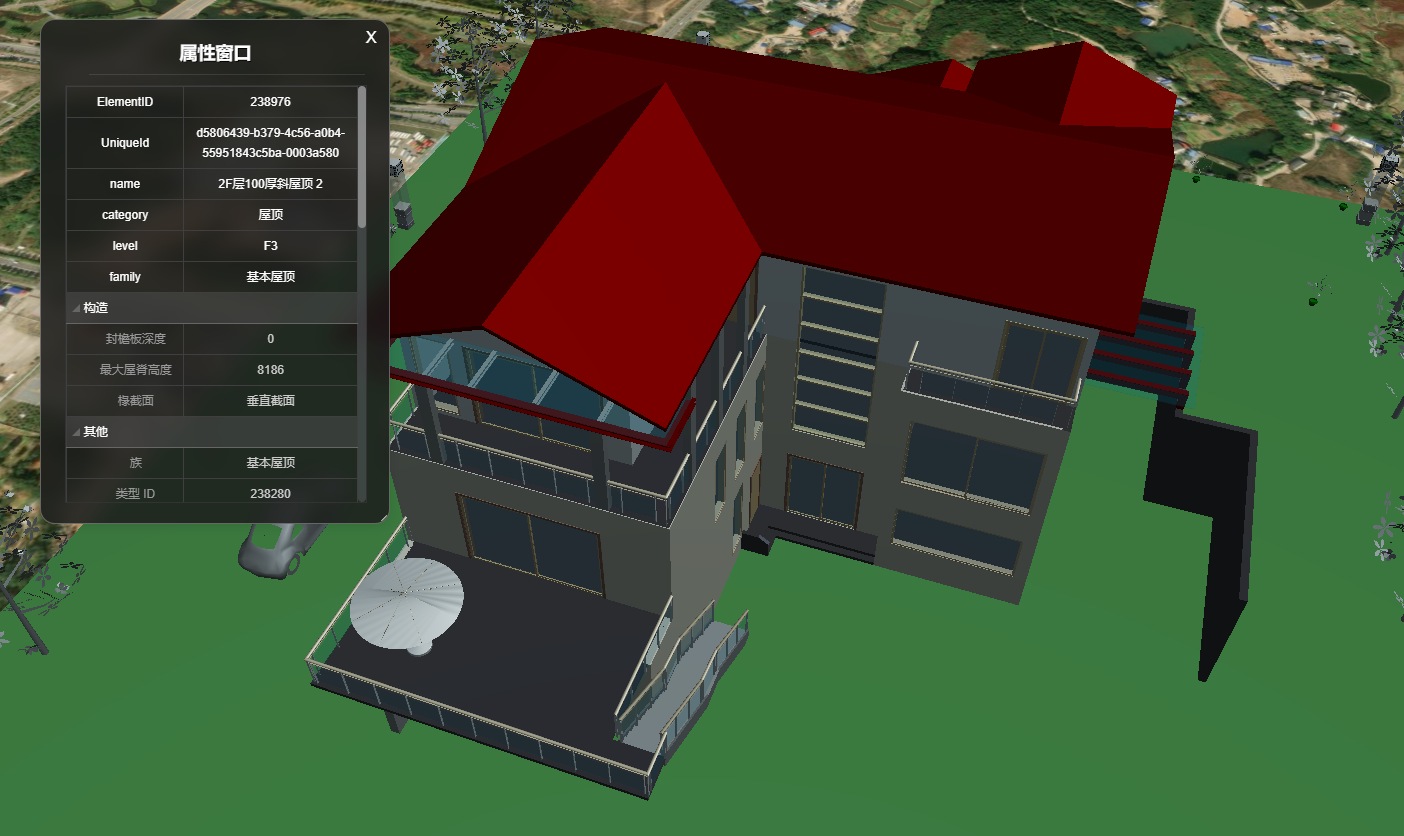
调用代码示例中的关键代码
js
// 开启右键菜单、点击高亮、属性property
uniCore.interact.setTilesRightClickMenu([{
  id: '城市白膜',
  url: '../../assets/3Dtiles/sample3_方法2_小别墅属性(1)/tileset.json',
  propertysURL: '../../assets/3Dtiles/sample3_方法2_小别墅属性(1)/01 小别墅.json'
}], (property) => this.$refs.mpInfoId.showProps(property));
新 UI 更换
你也可以修改组件代码,使用新的 UI。本示例提供另一种 UI 展示:
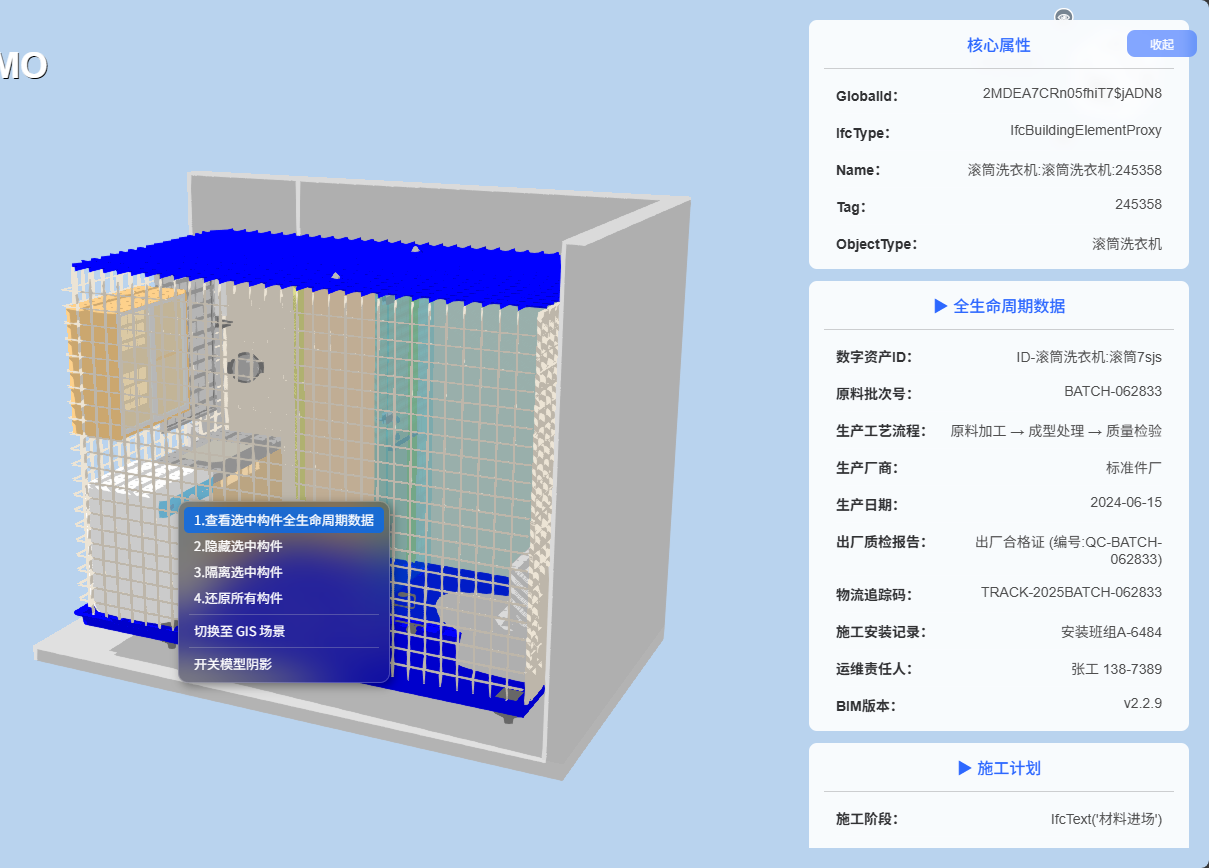
新 UI 组件代码示例
默认路径为 components/modelPropertyInfo/index.vue
js
<template>
  <div>
    <el-card class="box-card" v-show="tilespanelShow">
      <div class="tilespanel" style="z-index: 999999; left: 10px">
        <div class="tilesclose" @click="tilespanelShow = !tilespanelShow">
          收起
        </div>
        <div class="tilespanel-body">
          <div class="tilespanel-tips">"请选择一个构件,以查看属性"</div>
          <div class="cards-container scroll-bar">
            <!-- 核心属性卡片 -->
            <div v-if="coreAttributes.length" class="attribute-card">
              <div class="card-title">核心属性</div>
              <div class="card-content">
                <div
                  v-for="attr in coreAttributes"
                  :key="attr.key"
                  class="attribute-item"
                >
                  <span class="key">{{ attr.key }}:</span>
                  <span class="value">{{ attr.value }}</span>
                </div>
              </div>
            </div>
            <!-- 属性集卡片 -->
            <div
              v-for="pset in propertySets"
              :key="pset.pset_name"
              class="attribute-card"
            >
              <div class="card-title" @click="toggleCard">
                ▶ {{ pset.pset_name }}
              </div>
              <div class="card-content">
                <div
                  v-for="prop in pset.properties"
                  :key="prop.name"
                  class="attribute-item"
                >
                  <span class="key">{{ prop.name }}:</span>
                  <span class="value">{{ prop.cleanValue }}</span>
                </div>
              </div>
            </div>
          </div>
        </div>
        <div class="resize"></div>
      </div>
    </el-card>
  </div>
</template>

<script>
import $ from 'jquery';

export default {
  data () {
    return {
      tilespanelShow: false,
      coreAttributes: [],
      propertySets: []
    };
  },
  methods: {
    showProps (node) {
      node = node[0];
      const panel = $('.tilespanel');
      const panel_tips = panel.find('.tilespanel-tips');

      if (node) {
        panel_tips.hide();

        // 处理核心属性
        this.coreAttributes = ['GlobalId', 'IfcType', 'Name', 'Tag', 'ObjectType', 'Description', 'CompositionType']
          .filter(attr => node.attributes[attr])
          .map(attr => ({ key: attr, value: node.attributes[attr] }));

        // 处理属性集
        this.propertySets = node.property_sets.map(pset => ({
          pset_name: pset.pset_name,
          properties: pset.properties.map(prop => ({
            name: prop.name,
            cleanValue: prop.value
              .replace(/Ifc\w+$['"]?(.+?)['"]?$/g, '$1')
              .replace(/\.(T|F)\./g, match => match === '.T.' ? '是' : '否')
          }))
        }));

        this.tilespanelShow = true;
      } else {
        panel_tips.show();
      }
    },
    toggleCard (event) {
      const $card = $(event.target).closest('.attribute-card');
      $card.find('.card-content').slideToggle(200, 'swing', () => {
        $card.toggleClass('active-card');
      });
    },

  }
};
</script>

<style lang="scss" scoped>
.cards-container {
  display: flex;
  flex-direction: column;
  gap: 12px;
  max-height: 75vh;
}

.attribute-card {
  padding: 0 15px;
  background: rgba(255, 255, 255, 0.9);
  // border: 1px solid #4a4a4a;
  border-radius: 8px;
  backdrop-filter: blur(5px);
  transition: all 0.3s ease;

  .card-title {
    padding: 12px;
    font-weight: 500;
    color: #2d68ff;
    border-bottom: 1px solid #55555545;
    cursor: pointer;
    transition: background 0.2s;

    &:hover {
      background: rgba(255, 255, 255, 0.05);
    }
  }

  .card-content {
    padding: 8px 12px;
    max-height: 400px;
    overflow-y: auto;
  }

  .attribute-item {
    display: flex;
    justify-content: space-between;
    padding: 8px 0;
    border-bottom: 1px solid rgba(255, 255, 255, 0.1);

    &:last-child {
      border-bottom: none;
    }

    .key {
      font-weight: 700;
      // color: #9e9e9e;
    }

    .value {
      color: #4e4e4e;
      flex: 1;
      text-align: right;
      word-break: break-word;
    }
  }

  &.active-card {
    .card-title {
      background: rgb(255 255 255 / 45%);
    }
  }
}

/* 对于Chrome和Safari浏览器 */
.box-card::-webkit-scrollbar {
  display: none;
}
.card-content::-webkit-scrollbar {
  display: none;
}

.card-content {
  font-size: 14px;
}

::v-deep .box-card {
  position: absolute;
  top: 0;
  right: 0;
  height: calc(100% - 20px);
  width: 420px;
  background: #ffffff00;
  border: none;
  box-shadow: none !important;
  overflow-y: scroll;
  z-index: 999;

  .tilespanel {
    height: 85vh;
  }

  .scroll-bar {
    &::-webkit-scrollbar {
      width: 6px;
    }
  }
}

.tilesclose {
  position: fixed;
  right: 0px;
  width: 70px;
  font-size: 12px;
  margin: 10px 12px;
  padding: 5px 0;
  color: #ffffff;
  background: rgb(45 104 255 / 58%);
  /* border: 1px solid #ffffff; */
  border-radius: 8px;
  backdrop-filter: blur(5px);
  z-index: 999;
  cursor: pointer;
}

.tilesclose:hover {
  background: #1451ec;
}
</style>