
机械臂动画控制组件
功能介绍
通过机械臂动画控制组件,能够更方便地生成机械臂动画。你也可以参考代码修改为任何模型的动画。
本组件还使用到了 Tween 开源库。
不妨通过代码示例在 Vue 中尝试一下:
在线演示
点击 在线链接 以查看在线演示。
组件代码示例
默认路径为 components/roboticArmControl/index.vue
vue
<template>
  <div>
    <!-- 旋转控制面板 -->
    <div
      v-if="showControls"
      id="rotationControls"
      style="
        position: absolute;
        top: 10px;
        left: 10px;
        z-index: 1000;
        background: rgba(0, 0, 0, 0.7);
        color: white;
        padding: 15px;
        border-radius: 5px;
        font-family: Arial, sans-serif;
      "
    >
      <h3 style="margin-top: 0">旋转控制面板</h3>

      <div style="margin-bottom: 10px">
        <label for="nodeSelector">选择节点: </label>
        <select
          id="nodeSelector"
          v-model="selectedNodeName"
          @change="updateSelectedNode"
        >
          <option
            v-for="nodeName in nodeNames"
            :key="nodeName"
            :value="nodeName"
          >
            {{ nodeName }}
          </option>
        </select>
      </div>

      <div style="margin-bottom: 10px">
        <label
          >节点旋转: {{ selectedNodeName }} ({{ getNodeAxis }}轴):
          {{ getAngleForNode }}°</label
        >
        <div>
          <button
            @click="rotateByStep(-step)"
            style="
              padding: 5px 10px;
              margin-right: 5px;
              background: #f44336;
              color: white;
              border: none;
              border-radius: 3px;
              cursor: pointer;
            "
          >
            -
          </button>
          <button
            @click="rotateByStep(step)"
            style="
              padding: 5px 10px;
              margin-right: 5px;
              background: #4caf50;
              color: white;
              border: none;
              border-radius: 3px;
              cursor: pointer;
            "
          >
            +
          </button>
          <span style="margin-left: 10px">步长: {{ step }}°</span>
        </div>
      </div>
    </div>
  </div>
</template>

<script>
import * as Cesium from 'cesium'
import * as TWEEN from '@tweenjs/tween.js'

export default {
  name: 'RoboticArmControl',

  props: {
    // 是否显示动画控制窗口
    step: {
      type: Number,
      default: 20
    },
    showControls: {
      type: Boolean,
      default: true
    }
  },

  computed: {
    // 获取当前选中节点的旋转轴
    getNodeAxis () {
      const nodeIndex = this.nodeNames.indexOf(this.selectedNodeName);
      if (nodeIndex !== -1 && nodeIndex < this.nodeAxes.length) {
        return this.nodeAxes[nodeIndex];
      }
      return 'x'; // 默认返回x轴
    },

    // 获取当前选中节点的角度
    getAngleForNode () {
      if (this.selectedNodeName in this.nodeAngleMap) {
        return this.nodeAngleMap[this.selectedNodeName];
      }
      return 0; // 默认角度为0
    }
  },

  data () {
    return {
      xAngle: 0,
      yAngle: 0,
      zAngle: 0,
      selectedNodeName: "1大臂",
      currentNodes: {},
      currentTween: [], // 存储所有正在运行的 tween 实例数组,支持并行旋转
      isAnimating: false, // 控制动画循环的标志
      animationFrameId: null, // 存储 requestAnimationFrame 的 ID
      // 初始化参数
      modelUrl: '',
      modelPosition: [],
      modelScale: 1,
      nodeNames: [],
      nodeAxes: [],
      nodeAngleMap: {}
    }
  },

  // 生命周期 - 挂载完成
  mounted () {
    // 启动 TWEEN 动画循环
    this.animate();
  },

  // 生命周期 - 销毁前清理
  beforeDestroy () {
    this.destroy();
  },

  methods: {
    /**
     * 初始化机械臂模型
     * @param {Object} config - 初始化配置对象
     * @param {String} config.modelUrl - 模型URL
     * @param {Array} config.modelPosition - 模型位置 [lon, lat, height]
     * @param {Number} config.modelScale - 模型缩放大小
     * @param {Array} config.nodeNames - 节点名称数组
     * @param {Array} config.nodeAxes - 每个节点对应的旋转轴
     * @param {Object} config.nodeAngleMap - 节点角度映射
     */
    async init (config) {
      try {
        // 保存初始化参数
        const uniCore = config.uniCore;
        this.modelUrl = config.modelUrl || '';
        this.modelPosition = config.modelPosition || [];
        this.modelScale = config.modelScale || 1;
        this.nodeNames = config.nodeNames || [];
        this.nodeAxes = config.nodeAxes || [];
        this.nodeAngleMap = config.nodeAngleMap || {};

        // 加载 GLTF 模型
        const armModel = await uniCore.model.addGltf({
          lon: this.modelPosition[0],
          lat: this.modelPosition[1],
          height: this.modelPosition[2]
        }, {
          id: "机械臂模型",
          name: null,
          url: this.modelUrl,
          scale: this.modelScale,
          property: null
        });

        // 模型加载完成后获取关键节点
        armModel.readyEvent.addEventListener(() => {
          // 获取所有节点并保存初始矩阵
          this.currentNodes = {};
          this.nodeNames.forEach(name => {
            const node = armModel.getNode(name);
            if (node) {
              // 保存节点的初始矩阵
              node.initialMatrix = Cesium.Matrix4.clone(node.matrix);
              // 将节点存储到currentNodes对象中
              this.currentNodes[name] = node;
            }
          });

          // 存储模型以供使用
          window.currentModel = armModel;

          // 设置默认选中的节点
          this.selectedNodeName = this.nodeNames[0] || "";

          // 触发模型加载完成事件
          this.$emit('model-loaded', armModel);
        });

      } catch (error) {
        console.error('机械臂模型加载失败:', error);
        this.$emit('load-error', error);
      }
    },

    /**
     * 销毁组件,清理资源
     */
    destroy () {
      // 停止所有正在运行的 tween
      if (this.currentTween && this.currentTween.length > 0) {
        this.currentTween.forEach(tween => {
          tween.stop();
        });
        this.currentTween = [];
      }
      // 清除所有 tween
      TWEEN.removeAll();

      // 停止动画循环
      if (this.animationFrameId) {
        cancelAnimationFrame(this.animationFrameId);
        this.animationFrameId = null;
      }

      // 清理模型
      if (window.currentModel && window.viewer) {
        window.viewer.scene.primitives.remove(window.currentModel);
        window.currentModel = null;
      }

      // 清空节点
      this.currentNodes = {};
    },

    /**
     * 更新模型位置
     * @param {Array} position - [lon, lat, height]
     */
    updateModelPosition (position) {
      if (window.currentModel && window.viewer) {
        window.viewer.model.changeModelPos(window.currentModel, position);
      }
    },

    /**
     * 更新模型缩放
     * @param {Number} scale - 缩放比例
     */
    updateModelScale (scale) {
      if (window.currentModel) {
        window.currentModel.scale = scale;
      }
    },

    /**
     * 更新选中的节点
     */
    updateSelectedNode () {
      if (this.currentNodes[this.selectedNodeName]) {
        // 更新旋转角度为当前节点的旋转状态
        // 注意:这里需要根据实际情况获取当前节点的旋转状态
      }
    },

    /**
     * 通用旋转步进方法(带动画,支持并行)
     * @param {Number} step - 旋转步进角度
     * @param {String} nodeName - 可选,指定要旋转的节点名称,不指定则使用当前选中节点
     * @returns {Promise} 返回 Promise,在动画完成时 resolve
     */
    rotateByStep (step, nodeName = null) {
      return new Promise((resolve, reject) => {
        const targetNodeName = nodeName || this.selectedNodeName;
        const node = this.currentNodes[targetNodeName];

        if (node) {
          // 获取当前选中节点的索引
          const nodeIndex = this.nodeNames.indexOf(targetNodeName);
          if (nodeIndex !== -1 && nodeIndex < this.nodeAxes.length) {
            // 根据节点的自由度轴进行旋转
            const axis = this.nodeAxes[nodeIndex];

            // 获取当前角度
            const currentAngle = this.nodeAngleMap[targetNodeName] || 0;
            const targetAngle = currentAngle + step;

            // 使用 TWEEN 创建动画
            const tweenObj = { angle: currentAngle };

            const tween = new TWEEN.Tween(tweenObj)
              .to({ angle: targetAngle }, 500) // 500ms 动画时长
              .easing(TWEEN.Easing.Quadratic.InOut) // 使用缓动函数
              .onUpdate(() => {
                // 计算增量(步长)
                const stepAngle = tweenObj.angle - this.nodeAngleMap[targetNodeName];

                // 根据轴应用旋转
                switch (axis) {
                  case 'x':
                    this.xAngle = tweenObj.angle;
                    this.rotateX(node, stepAngle);
                    break;
                  case 'y':
                    this.yAngle = tweenObj.angle;
                    this.rotateY(node, stepAngle);
                    break;
                  case 'z':
                    this.zAngle = tweenObj.angle;
                    this.rotateZ(node, stepAngle);
                    break;
                  default:
                    console.warn(`未知的旋转轴: ${axis},节点: ${targetNodeName}`);
                }

                // 更新节点角度映射
                this.nodeAngleMap[targetNodeName] = tweenObj.angle;

                // 触发角度更新事件
                this.$emit('angle-updated', targetNodeName, tweenObj.angle);
              })
              .onComplete(() => {
                // 从数组中移除已完成的 tween
                const index = this.currentTween.indexOf(tween);
                if (index > -1) {
                  this.currentTween.splice(index, 1);
                }
                this.$emit('rotation-complete', targetNodeName, targetAngle);
                resolve(targetAngle); // 动画完成时 resolve
              })
              .start();

            // 将 tween 添加到数组中
            this.currentTween.push(tween);

          } else {
            console.warn(`节点 ${targetNodeName} 没有对应的旋转轴定义`);
            reject(new Error(`节点 ${targetNodeName} 没有对应的旋转轴定义`));
          }
        } else {
          console.warn(`节点 ${targetNodeName} 不存在`);
          reject(new Error(`节点 ${targetNodeName} 不存在`));
        }
      });
    },

    /**
     * 绕X轴旋转节点(增量旋转)
     * @param {Object} node - 节点对象
     * @param {Number} angle - 旋转角度(度)
     */
    rotateX (node, angle) {
      if (!node) {
        throw new Error("node 尚未初始化");
      }

      // 将角度转换为弧度
      const angleInRadians = Cesium.Math.toRadians(angle);

      // 创建旋转矩阵
      const rotation = Cesium.Matrix3.fromRotationX(angleInRadians);

      // 将旋转应用到当前矩阵
      node.matrix = Cesium.Matrix4.multiplyByMatrix3(node.matrix, rotation, node.matrix);
    },

    /**
     * 绕Y轴旋转节点(增量旋转)
     * @param {Object} node - 节点对象
     * @param {Number} angle - 旋转角度(度)
     */
    rotateY (node, angle) {
      if (!node) {
        throw new Error("node 尚未初始化");
      }

      // 将角度转换为弧度
      const angleInRadians = Cesium.Math.toRadians(angle);

      // 创建旋转矩阵
      const rotation = Cesium.Matrix3.fromRotationY(angleInRadians);

      // 将旋转应用到当前矩阵
      node.matrix = Cesium.Matrix4.multiplyByMatrix3(node.matrix, rotation, node.matrix);
    },

    /**
     * 绕Z轴旋转节点(增量旋转)
     * @param {Object} node - 节点对象
     * @param {Number} angle - 旋转角度(度)
     */
    rotateZ (node, angle) {
      if (!node) {
        throw new Error("node 尚未初始化");
      }

      // 将角度转换为弧度
      const angleInRadians = Cesium.Math.toRadians(angle);

      // 创建旋转矩阵
      const rotation = Cesium.Matrix3.fromRotationZ(angleInRadians);

      // 将旋转应用到当前矩阵
      node.matrix = Cesium.Matrix4.multiplyByMatrix3(node.matrix, rotation, node.matrix);
    },

    /**
     * 通用旋转函数,支持绕任意轴旋转
     * @param {Object} node - 节点对象
     * @param {Number} xAngle - X轴旋转角度(度)
     * @param {Number} yAngle - Y轴旋转角度(度)
     * @param {Number} zAngle - Z轴旋转角度(度)
     */
    rotate (node, xAngle, yAngle, zAngle) {
      if (!node) {
        throw new Error("node 尚未初始化");
      }

      // 如果节点没有保存初始矩阵,则保存当前矩阵作为初始状态
      if (!node.initialMatrix) {
        node.initialMatrix = Cesium.Matrix4.clone(node.matrix);
      }

      // 从初始矩阵开始计算旋转
      const initialMatrix = node.initialMatrix;

      // 获取初始位置
      const position = new Cesium.Cartesian3();
      Cesium.Matrix4.getTranslation(initialMatrix, position);

      // 创建绕各轴的旋转矩阵
      const rotX = Cesium.Matrix3.fromRotationX(Cesium.Math.toRadians(xAngle));
      const rotY = Cesium.Matrix3.fromRotationY(Cesium.Math.toRadians(yAngle));
      const rotZ = Cesium.Matrix3.fromRotationZ(Cesium.Math.toRadians(zAngle));

      // 按ZYX顺序组合旋转矩阵 (Tait-Bryan angles)
      let rotationMatrix = Cesium.Matrix3.clone(rotX);
      if (yAngle !== 0) {
        const tempMatrix = Cesium.Matrix3.multiply(rotY, rotationMatrix, new Cesium.Matrix3());
        rotationMatrix = tempMatrix;
      }
      if (zAngle !== 0) {
        const tempMatrix = Cesium.Matrix3.multiply(rotZ, rotationMatrix, new Cesium.Matrix3());
        rotationMatrix = tempMatrix;
      }

      // 创建新的变换矩阵,保持位置不变,只更新旋转
      const newMatrix = Cesium.Matrix4.fromRotationTranslation(rotationMatrix, position);

      node.matrix = newMatrix;
    },

    /**
     * 旋转指定节点到指定角度
     * @param {String} nodeName - 节点名称
     * @param {Number} angle - 目标角度(度)
     * @param {Number} duration - 动画时长(毫秒),默认500ms
     */
    rotateNodeToAngle (nodeName, angle, duration = 500) {
      const node = this.currentNodes[nodeName];
      if (!node) {
        console.warn(`节点 ${nodeName} 不存在`);
        return;
      }

      const nodeIndex = this.nodeNames.indexOf(nodeName);
      if (nodeIndex === -1 || nodeIndex >= this.nodeAxes.length) {
        console.warn(`节点 ${nodeName} 没有对应的旋转轴定义`);
        return;
      }

      const axis = this.nodeAxes[nodeIndex];
      const currentAngle = this.nodeAngleMap[nodeName] || 0;

      // 如果有正在运行的 tween,先停止它
      if (this.currentTween) {
        this.currentTween.stop();
      }

      // 使用 TWEEN 创建动画
      const tweenObj = { angle: currentAngle };

      this.currentTween = new TWEEN.Tween(tweenObj)
        .to({ angle: angle }, duration)
        .easing(TWEEN.Easing.Quadratic.InOut)
        .onUpdate(() => {
          const stepAngle = tweenObj.angle - this.nodeAngleMap[nodeName];

          switch (axis) {
            case 'x':
              this.rotateX(node, stepAngle);
              break;
            case 'y':
              this.rotateY(node, stepAngle);
              break;
            case 'z':
              this.rotateZ(node, stepAngle);
              break;
          }

          this.nodeAngleMap[nodeName] = tweenObj.angle;
          this.$emit('angle-updated', nodeName, tweenObj.angle);
        })
        .onComplete(() => {
          this.currentTween = null;
          this.$emit('rotation-complete', nodeName, angle);
        })
        .start();
    },

    /**
     * 重置所有节点到初始状态
     */
    resetAllNodes () {
      this.nodeNames.forEach(nodeName => {
        const node = this.currentNodes[nodeName];
        if (node && node.initialMatrix) {
          // 恢复初始矩阵
          node.matrix = Cesium.Matrix4.clone(node.initialMatrix);
          // 重置角度
          this.nodeAngleMap[nodeName] = 0;
        }
      });
      this.$emit('reset-complete');
    },

    /**
     * 获取节点当前角度
     * @param {String} nodeName - 节点名称
     * @returns {Number} 当前角度(度)
     */
    getNodeAngle (nodeName) {
      return this.nodeAngleMap[nodeName] || 0;
    },

    /**
     * 获取所有节点角度
     * @returns {Object} 节点角度映射对象
     */
    getAllNodeAngles () {
      return { ...this.nodeAngleMap };
    },

    /**
     * 设置选中的节点
     * @param {String} nodeName - 节点名称
     */
    setSelectedNode (nodeName) {
      if (this.nodeNames.includes(nodeName)) {
        this.selectedNodeName = nodeName;
      } else {
        console.warn(`节点 ${nodeName} 不在节点列表中`);
      }
    },

    /**
     * 获取当前选中的节点名称
     * @returns {String} 节点名称
     */
    getSelectedNode () {
      return this.selectedNodeName;
    },

    /**
     * 获取节点对象
     * @param {String} nodeName - 节点名称
     * @returns {Object} 节点对象
     */
    getNode (nodeName) {
      return this.currentNodes[nodeName];
    },

    /**
     * 获取模型对象
     * @returns {Object} 模型对象
     */
    getModel () {
      return window.currentModel;
    },

    /**
     * TWEEN 动画更新循环
     * @param {Number} time - 时间戳
     */
    animate (time) {
      this.animationFrameId = requestAnimationFrame(this.animate);
      if (this.currentTween) {
        this.currentTween.forEach((e) => {
          e.update(time);
        })
      }
    }
  }
}
</script>

<style scoped>
#rotationControls {
  font-size: 14px;
}

#rotationControls label {
  display: inline-block;
  width: 120px;
  margin-right: 10px;
}

#rotationControls input[type='range'] {
  vertical-align: middle;
}

#rotationControls button {
  margin-right: 5px;
}
</style>
调用代码示例
vue
<template>
  <div>
    <div id="unicoreContainer"></div>

    <!-- 机械臂控制组件开启 -->
    <RoboticArmControl ref="armControl" :step="15" :show-controls="true" />
    <!-- 机械臂控制组件结束 -->

  </div>
</template>

<script>
import { UniCore } from 'unicore-sdk'
import { config } from 'unicore-sdk/unicore.config'
import 'unicore-sdk/Widgets/widgets.css'
import RoboticArmControl from '@/components/roboticArmControl' // 机械臂控制组件

export default {
  components: {
    RoboticArmControl
  },

  // 生命周期 - 挂载完成
  mounted () {
    this.init();
  },

  methods: {
    /**
    * 通用图形引擎初始化
    */
    async init () {
      // 初始化UniCore
      let accessToken = "eyJhbGciOiJIUzI1NiIsInR5cCI6IkpXVCJ9.eyJqdGkiOiIxNjEwMzI4My01MjBmLTQzYzktOGZiMS0wMDRhZjE0N2IyMGIiLCJpZCI6MTc1NzkyLCJpYXQiOjE3MTM3NzQ3OTh9.zU-R4MNvHr8rvn1v28PQfDImyutnpPF2lmEgGeSPckQ";
      let uniCore = new UniCore(config, accessToken);
      uniCore.init("unicoreContainer");
      let viewer = uniCore.viewer;

      // 视角初始化
      uniCore.position.buildingPosition(uniCore.viewer, [113.12380548015745, 28.250758831850005, 700], -20, -45, 1);

      // 初始化机械臂控制组件,传递初始化参数
      this.$refs.armControl.init({
        uniCore: uniCore,
        modelUrl: '../../../assets/gltf/机械臂-带层级(2).glb',
        modelPosition: [113.12098820449636, 28.256150218457687, 50],
        modelScale: 1,
        nodeNames: ["1大臂", "2大臂", "3大臂", "4双叉臂", "5小臂", "6旋转", "10夹爪1", "10夹爪2"],
        nodeAxes: ["y", "y", "z", "x", "x", "z", "x", "x"],
        nodeAngleMap: {
          "1大臂": 0,
          "2大臂": 0,
          "3大臂": 0,
          "4双叉臂": 0,
          "5小臂": 0,
          "6旋转": 0,
          "10夹爪1": 0,
          "10夹爪2": 0
        }
      });
    },

  }
}
</script>
<style scoped>
#unicoreContainer {
  position: absolute;
  top: 0;
  left: 0;
  width: 100%;
  height: 100%;
  overflow: hidden;
  background: black;
}
</style>
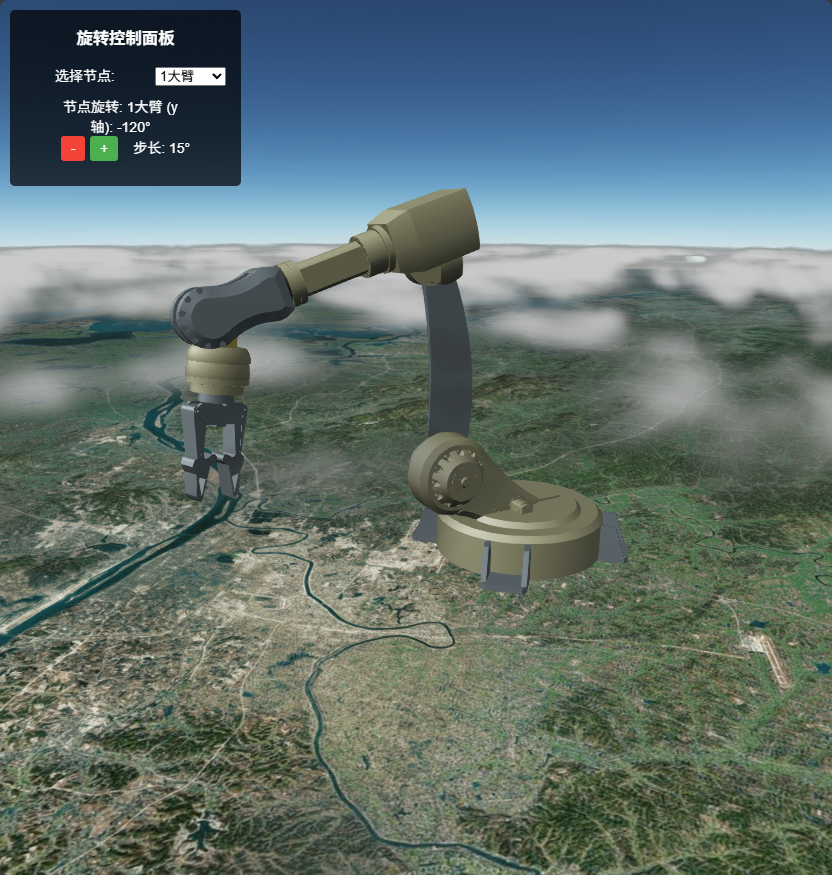
示例运行结果
调用代码示例中的关键代码
js
// 初始化机械臂控制组件,传递初始化参数
this.$refs.armControl.init({
  uniCore: uniCore,
  modelUrl: '../../../assets/gltf/机械臂-带层级(2).glb',
  modelPosition: [113.12098820449636, 28.256150218457687, 50],
  modelScale: 1,
  nodeNames: ["1大臂", "2大臂", "3大臂", "4双叉臂", "5小臂", "6旋转", "10夹爪1", "10夹爪2"],
  nodeAxes: ["y", "y", "z", "x", "x", "z", "x", "x"],
  nodeAngleMap: {
    "1大臂": 0,
    "2大臂": 0,
    "3大臂": 0,
    "4双叉臂": 0,
    "5小臂": 0,
    "6旋转": 0,
    "10夹爪1": 0,
    "10夹爪2": 0
  }
});
nodeNames 为需要控制的节点名称,你可以在专业软件如 blender 获取。
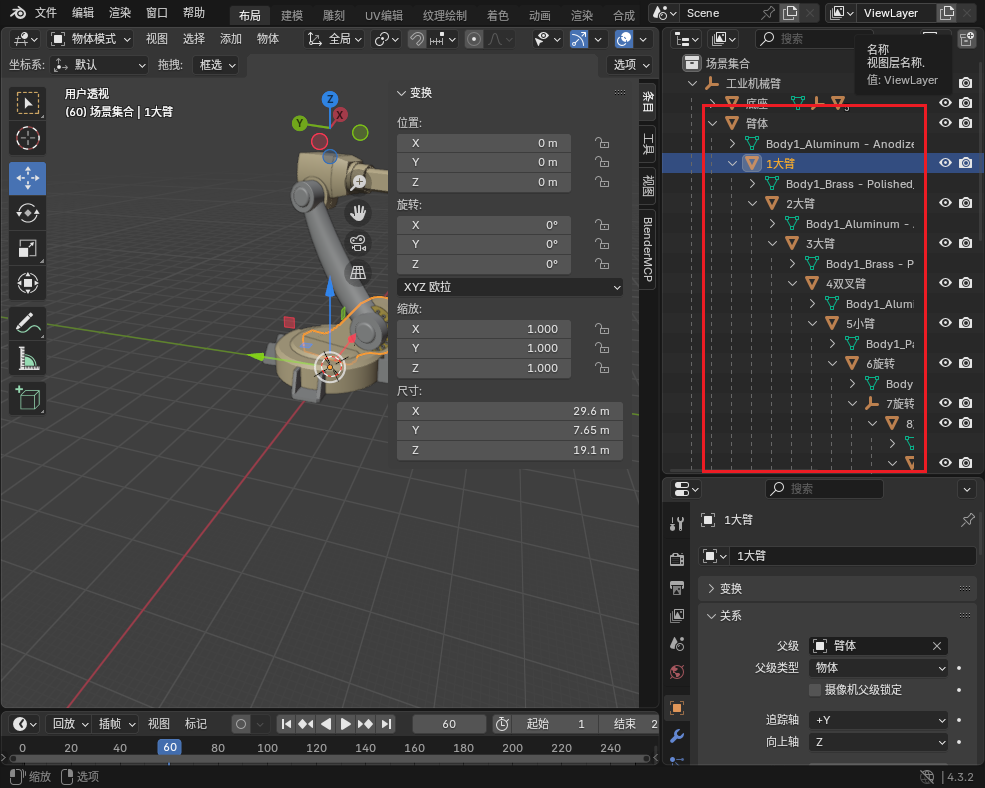
nodeAxes 为需要控制节点对应的旋转轴。
nodeAngleMap 为需要控制的节点对应的初始角度。
拓展
此外,你可以应用动画。
js
/**
 * 延迟函数辅助器
 * @param {Number} ms - 延迟毫秒数
 * @returns {Promise}
 */
delay (ms) {
  return new Promise(resolve => setTimeout(resolve, ms));
},

/**
 * 执行机械臂动画序列
 */
async executeArmAnimation () {
  try {
    // 等待 2 秒后开始动画
    await this.delay(2000);

    // 依次执行旋转动画
    await this.$refs.armControl.rotateByStep(-45, "1大臂");
    await this.$refs.armControl.rotateByStep(-75, "1大臂");
    await Promise.all([
    this.$refs.armControl.rotateByStep(35, "3大臂");
    this.$refs.armControl.rotateByStep(720, "6旋转");
    this.$refs.armControl.rotateByStep(75, "5小臂");
    this.$refs.armControl.rotateByStep(75, "4双叉臂");
    this.$refs.armControl.rotateByStep(15, "10夹爪1");
    this.$refs.armControl.rotateByStep(15, "10夹爪2");
    ])
    await this.delay(600);
    await Promise.all([
    this.$refs.armControl.rotateByStep(-15, "10夹爪1");
    this.$refs.armControl.rotateByStep(-15, "10夹爪2");
    ])
    await this.delay(600);
    await Promise.all([
    this.$refs.armControl.rotateByStep(-35, "2大臂");
    this.$refs.armControl.rotateByStep(-15, "3大臂");
    this.$refs.armControl.rotateByStep(-45, "5小臂");
    this.$refs.armControl.rotateByStep(-60, "4双叉臂");
    this.$refs.armControl.rotateByStep(90, "6旋转");
    ])

    console.log('机械臂动画序列执行完成');
  } catch (error) {
    console.error('机械臂动画执行失败:', error);
  }
},
注意,使用 await 可以让动画按顺序依次进行。如果想要多个动画同时进行,你需要使用 Promise.all 包裹多个需要同时进行的动画。这样即使浏览器标签页失焦、动画一度被暂停,回到页面时,当前批次的所有关节会先补完到应到的位置,然后才进入下一批,不会出现“有些关节没跑完、后面的动作又叠上去”的问题。