
模型显隐控制组件
功能介绍
自动获取当前场景所有模型,并能通过按钮控制对应模型级别的显隐。
你可以使用 图层管理树组件 代替此组件。
注:该功能使用了 elementUI 库,使用前需安装该库,具体方法见 elementUI 安装 。
不妨通过代码示例在 Vue 中尝试一下:
在线演示
点击 在线链接 以查看在线演示。
组件代码示例
默认路径为 components/showModelSet/index.vue
vue
<template>
  <div>
    <!-- 显隐按钮开始 -->
    <el-checkbox-group
      ref="showCheck"
      v-show="isShowCheckbox"
      v-model="checkboxGroup"
      size="mini"
      style="position: absolute; bottom: 100px; left: 0; right: 0; z-index: 999"
    >
      <el-checkbox-button
        v-for="model in modelOptions"
        :label="model"
        :key="model"
        style="margin: 1px"
        @change="showModel()"
        >{{ model }}</el-checkbox-button
      >
    </el-checkbox-group>
    <!-- 显隐按钮结束 -->
  </div>
</template>

<script type="text/javascript">

export default {
  data () {
    return {
      isShowCheckbox: true, //构件显隐窗口显示
      checkboxGroup: [], //构件显隐按钮组
      modelOptions: [], //构件组
    }
  },

  methods: {

    /**
     * 初始化
     */
    init (modelOptions) {
      this.modelOptions = modelOptions;
      this.checkboxGroup = this.modelOptions;
    },

    /**
  * 构件显隐
  */
    showModel () {
      window.uniCore.model.setPrimitivesShow(this.checkboxGroup)
    },

  }
}
</script>

<style rel="stylesheet/scss" lang="scss" scoped>
::v-deep .el-checkbox-button__inner {
  background: #ffffff80;
  color: #00000080;
}
::v-deep .el-checkbox-button__inner:hover {
  color: #f8f8f8c5;
}
::v-deep .el-checkbox-button.is-focus .el-checkbox-button__inner {
  border-color: #ffffff4d;
}
::v-deep .el-checkbox-button.is-checked:first-child .el-checkbox-button__inner {
  border-left-color: #ffffff4d;
}
::v-deep .el-checkbox-button.is-checked .el-checkbox-button__inner {
  color: #ffffff;
  background-color: #00000080;
  border-color: #ffffff4d;
  box-shadow: -1px 0 0 0 #00000080;
  border-radius: 10px;
  backdrop-filter: blur(10px);
}
::v-deep .el-checkbox-button--mini .el-checkbox-button__inner,
::v-deep .el-checkbox-button:first-child .el-checkbox-button__inner,
::v-deep .el-checkbox-button:last-child .el-checkbox-button__inner {
  border-radius: 10px;
  backdrop-filter: blur(10px);
}
</style>
调用代码示例
vue
<template>
  <div id="unicoreContainer">
    <!-- 构件显隐组件窗口卡片开始 -->
    <smSet ref="smSetId"></smSet>
    <!-- 构件显隐组件窗口卡片结束 -->
  </div>
</template>

<script>
import { UniCore } from 'unicore-sdk'
import { config } from 'unicore-sdk/unicore.config'
import 'unicore-sdk/Widgets/widgets.css'
import smSet from '@/components/showModelSet/index.vue'; //构件显隐组件


export default {

  components: {
    smSet
  },
  // 生命周期 - 挂载完成(可以访问DOM元素)
  mounted () {
    this.init();
  },

  // 方法集合
  methods: {

    /**
    * 通用图形引擎初始化
    */
    init () {

      // 初始化UniCore

      // 目前采用Cesium的地形&底图数据,这里配置Cesium的token
      let accessToken = "eyJhbGciOiJIUzI1NiIsInR5cCI6IkpXVCJ9.eyJqdGkiOiIxNjEwMzI4My01MjBmLTQzYzktOGZiMS0wMDRhZjE0N2IyMGIiLCJpZCI6MTc1NzkyLCJpYXQiOjE3MTM3NzQ3OTh9.zU-R4MNvHr8rvn1v28PQfDImyutnpPF2lmEgGeSPckQ";
      // 初始化unicore
      let uniCore = new UniCore(config, accessToken);
      uniCore.init("unicoreContainer");
      window.uniCore = uniCore;
      let viewer = uniCore.viewer;

      // 视角初始化
      uniCore.position.buildingPosition(viewer, [113.12380548015745, 28.250758831850005, 700], -20, -45, 1);

      /**
       * 小别墅1号示例
       */
      let options = {
        id: '小别墅1号示例',
        url: '../../assets/3Dtiles/sample3_方法2_小别墅属性(1)/tileset.json',
        propertysURL: '../../assets/3Dtiles/sample3_方法2_小别墅属性(1)/01 小别墅.json'
      }
      //加载3dtiles
      uniCore.model.createTileset(options.url, options).then(cityLeft => {
        uniCore.model.changeModelPos(cityLeft, [113.12098820449636, 28.256150218457687, 130], [0, 0, 0], [23.8, 23.8, 23.8])
      })


      /**
         * 小别墅2号示例
         */
      options = {
        id: '小别墅2号示例',
        url: '../../assets/3Dtiles/sample3_方法2_小别墅属性(1)/tileset.json'
      }
      //加载3dtiles
      uniCore.model.createTileset(options.url, options).then(cityLeft => {
        uniCore.model.changeModelPos(cityLeft, [113.12098820449636, 28.266150218457687, 130], [0, 0, 0], [23.8, 23.8, 23.8])
      })


      // 等到所有模型都加载后即调用,这里简化代码用定时器代替
      setTimeout(() => {
        this.$refs.smSetId.init(uniCore.model.getPrimitivesName())
      }, 3000)

    }
  }

}
</script>
<style scoped>
#unicoreContainer {
  position: absolute;
  top: 0;
  left: 0;
  width: 100%;
  height: 100%;
  overflow: hidden;
  background: black;
}
</style>
示例运行结果
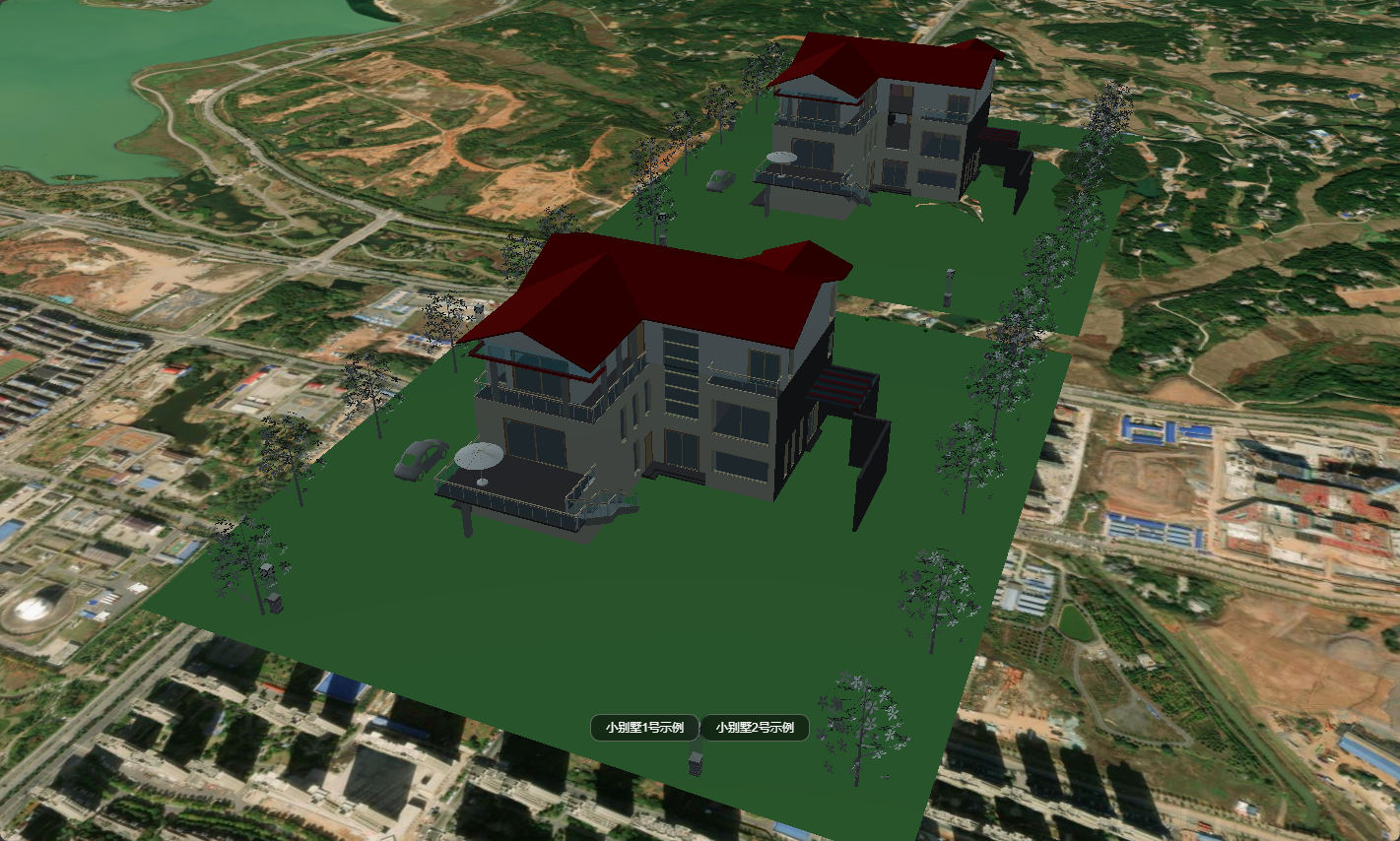
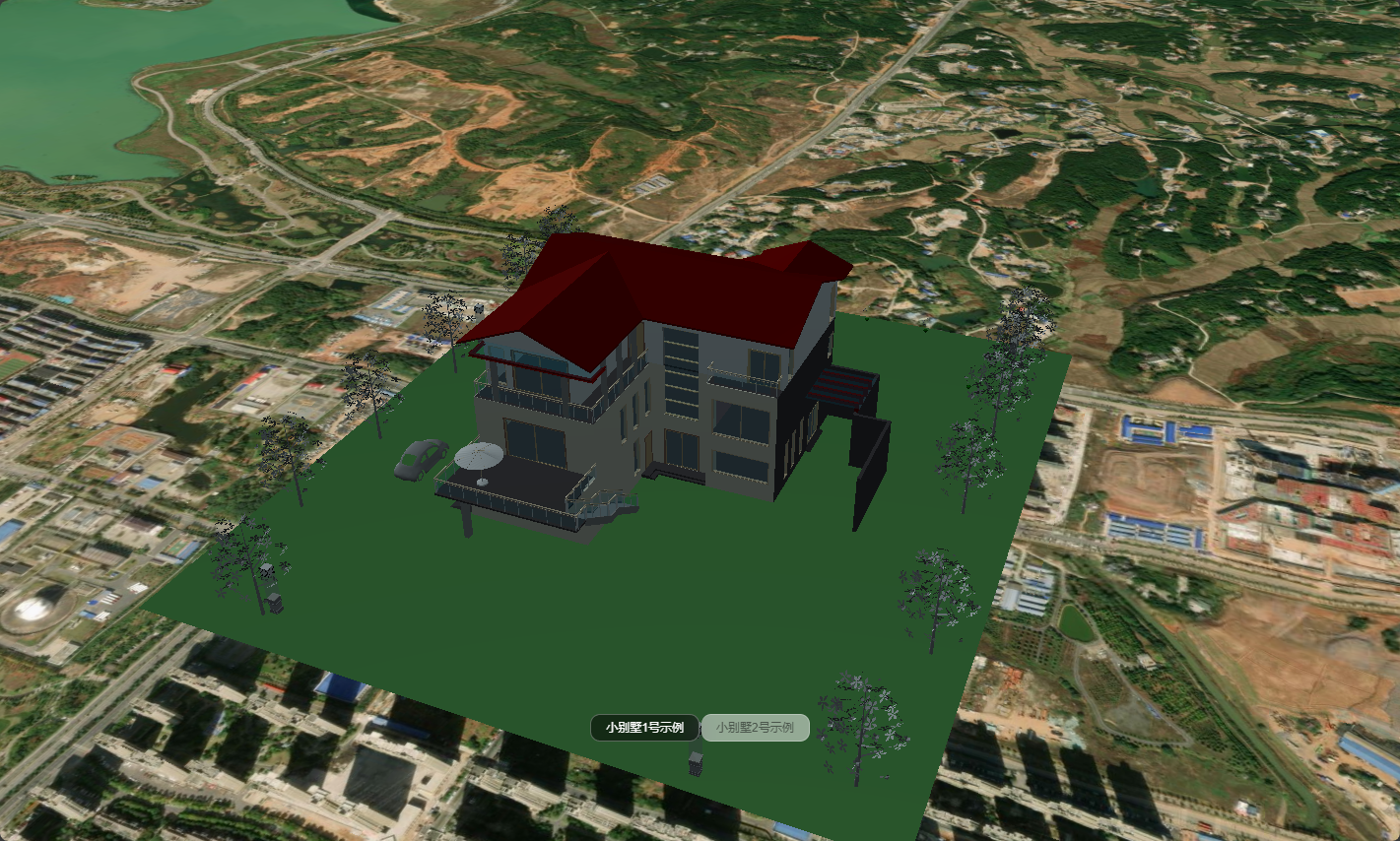
调用代码示例中的关键代码
js
// 等到所有模型都加载后即调用,这里简化代码用定时器代替
setTimeout(() => {
  this.$refs.smSetId.init(uniCore.model.getPrimitivesName())
}, 3000)
结合地形挖地可能出现的问题
如果在使用本功能时会导致地形挖地也被连带隐藏了,可以加入 ignore 参数 ['地形挖地底面', '地形挖地墙体'] 规避:
js
uniCore.model.setPrimitivesShow(['城市白膜', '城市白膜2'], false, true, ['地形挖地底面', '地形挖地墙体'])